


TP-Link Archer BE800 Review: A Multi-Gig Wi-Fi 7 Router Built for Wired Speed
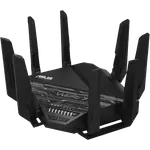
The Archer BE800 is a high-end Wi-Fi 7 router aimed at buyers with fast internet plans and a home full of wired and wireless devices. Owners consistently report excellent range and speed, often outperforming older mesh systems and matching or exceeding gigabit-plus ISP plans, plus an easy setup process even for large networks. Its rare combination of 2.5 Gbps and 10 Gbps ports stands out for buyers who want a genuinely future-proof, wired-first network. The main trade-offs are some early Wi-Fi 7 client connection quirks and a front display some find more gimmick than useful, but as a fast, stable router and mesh base, it holds up well.
- Gigabit-plus and multi-gig internet plans
- Large households with many wired and wireless devices
- Buyers wanting a mesh setup with strong range
- Home networks needing 2.5G/10G wired ports
Pros
- Excellent range and speed, outperforming older mesh setups for many owners
- Rare mix of 2.5 Gbps and 10 Gbps wired ports plus SFP+
- Wi-Fi 7 with Multi-Link Operation (MLO) support
- Easy setup even for large, complex networks
- Guest network, IoT network and WPA3 encryption included
- 2-year warranty
Cons
- Some reviewers report inconsistent Wi-Fi 7 client connection stability
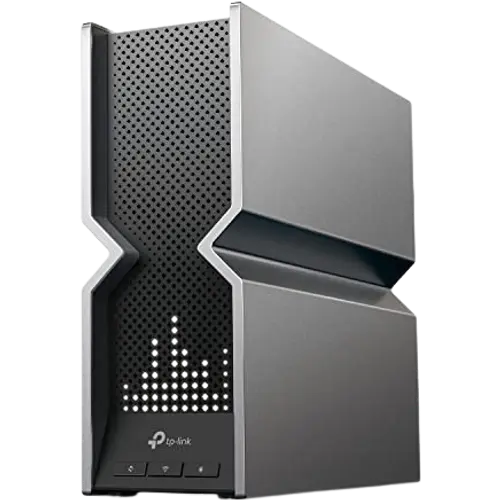
- Front LED display seen by some as more gimmick than useful
- No Thread border router support
- No VPN client/server or configuration backup and restore
- No built-in speed test tool
Who is the TP-Link Archer BE800 for?
The BE800 is a Wi-Fi 7 router supporting Wi-Fi 5, 6, 6E and 7, with Multi-Link Operation (MLO), a rated max Wi-Fi speed of 19 Gbps, mesh Wi-Fi, guest and IoT networks, and WPA3 encryption. Its network-ports layout is unusually generous for the category, including 10 Gbps WAN and LAN ports, an SFP+ port, and multiple 2.5 Gbps LAN ports, making it a strong fit for buyers who want to wire NAS devices, gaming PCs or a fiber modem at full speed rather than relying purely on Wi-Fi.
What buyers love
The most consistent praise is raw performance: owners report hitting the full speed of gigabit and even multi-gigabit ISP plans, and several directly compare it favorably to other mesh systems and previous routers for both range and stability through walls and multiple floors. The 2.5G/10G port mix is repeatedly called out as rare and valuable for wired setups, and setup through the app is frequently described as straightforward even for people replacing complex multi-node mesh systems. QoS, guest network and IoT network support round out a feature set reviewers consider strong for the price.
What to know before you buy
The most notable caveat is that Wi-Fi 7 itself is still maturing: a few reviewers report inconsistent signal behavior specifically tied to Wi-Fi 7 client connections, even while praising the hardware otherwise. The front LED display is described by more than one reviewer as more of a gimmick than genuinely useful, though it can help surface error states. This model does not include a Thread border router, VPN client or server, or configuration backup and restore, and it lacks a built-in speed test tool, so pair it with third-party testing if that matters to you.
Is the TP-Link Archer BE800 worth it?
For buyers with fast internet service and a demanding mix of wired and wireless devices, the BE800 delivers class-leading range, stability and port flexibility backed by a 2-year warranty. It is best suited to networks that want to take advantage of multi-gig wired speeds rather than Wi-Fi 7 alone, and buyers should expect the occasional early-generation Wi-Fi 7 client quirk rather than a flawless launch experience.
Frequently asked questions
Does the TP-Link Archer BE800 support Wi-Fi 7?
Yes, it supports Wi-Fi 7 alongside Wi-Fi 5, 6 and 6E, and includes Multi-Link Operation (MLO) for combining bands.
How many wired ports does it have?
It has a generous mix for the category: 10 Gbps WAN and LAN ports, an SFP+ port, and multiple 2.5 Gbps LAN ports, seven ports total.
Can I use it as a mesh system?
Yes, it supports mesh Wi-Fi, and owners report strong range and stability when running multiple BE800 units together across a multi-floor home.
Does it support a VPN?
No, it does not include a VPN client or server, or protocols like OpenVPN or WireGuard.
Does it work as a Thread border router?
No, this router does not include Thread border router support for smart home devices.
Is Wi-Fi 7 performance reliable on this router?
Most owners report strong overall speed and range, though a few reviewers note occasional Wi-Fi 7 client connection quirks, which is common as Wi-Fi 7 device support matures.