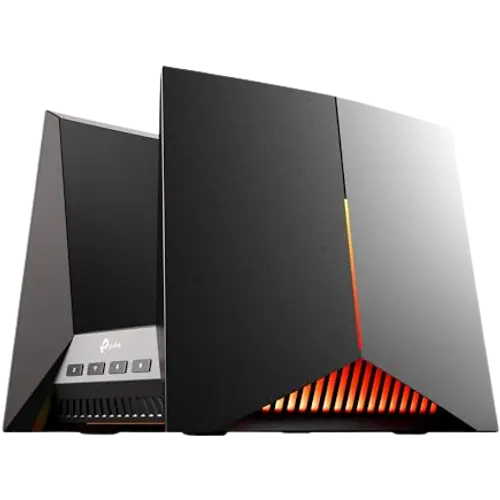


TP-Link Archer GE800 Review: A Wi-Fi 7 Gaming Router That Trades Some Long-Term Reliability for Serious Speed
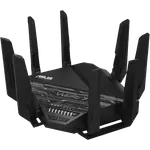
The Archer GE800 is a high-end tri-band Wi-Fi 7 router built for large homes and gamers who want to remove extenders and cut latency. Owners consistently praise the coverage upgrade over older routers and the smooth, low-lag gaming performance, and the multi-gig port selection (dual 10 Gbps plus four 2.5 Gbps LAN ports) makes it a serious wired backbone too. The trade-off is a vocal minority reporting reboots, dropped connections or outright failures after months of use, so buyers should lean on the warranty and keep an eye on stability rather than assume flawless long-term reliability.
- Large homes replacing Wi-Fi extenders
- Gamers wanting low-latency wired and wireless performance
- Households with many connected smart-home devices
- Buyers who want a multi-gig wired backbone
Pros
- Wi-Fi 7 speed with mesh Wi-Fi and MLO for eliminating dead zones and extenders
- Strong coverage reported in large, multi-story homes
- Low-latency performance well suited to gaming
- Multi-gig wired backbone: dual 10 Gbps and quad 2.5 Gbps LAN ports plus a 10 Gbps SFP+ port
- Quality of Service to prioritize specific devices
Cons
- Some owners report reboots or dropped connections developing after months of use
- A minority of units reportedly fail outright after a few months, despite the warranty
- Admin web interface session drops reported by at least one owner
- Guest network, WPA3 encryption, VPN and parental-control details are not fully documented for this listing
- Included plug/accessories can be region-specific for buyers outside the US
Who is the TP-Link Archer GE800 for?
The Archer GE800 targets households moving up from an aging router or a Wi-Fi 5/6 mesh setup that still leaves dead zones. It supports Wi-Fi 5, Wi-Fi 6, Wi-Fi 6E and Wi-Fi 7, with mesh Wi-Fi and MLO (Multi-Link Operation) so a Wi-Fi 7 client can use multiple bands at once instead of switching between them. Reviewers who upgraded from older Wi-Fi 6/6E routers describe covering multi-story, multi-thousand-square-foot homes without an extender, and gamers highlight the dedicated gaming features and low latency. Its combination of high-speed wireless and a heavy multi-gig port count (two 10 Gbps and four 2.5 Gbps LAN ports, plus a 10 Gbps SFP+ port) also suits anyone building a fast wired network for a NAS, gaming PC or a smart-home hub that benefits from Quality of Service prioritization.
What buyers love
The most consistent praise is coverage: multiple owners specifically describe eliminating a Wi-Fi extender after switching to the GE800, with strong, even signal reaching outdoor cameras and far rooms in large houses. Gaming performance is another recurring theme, with reviewers citing stable, low-latency connections and smoother online play, which lines up with the router's Quality of Service support for prioritizing specific devices. Setup and the companion app are called straightforward, letting owners see connected devices and manage the network without much fuss. The jump to Wi-Fi 7 and its 19 Gbps maximum Wi-Fi speed is repeatedly described as a noticeable, tangible upgrade over previous-generation routers, especially for households with many simultaneous connections.
What to know before you buy
The clearest caveat from real owners is long-term reliability. Several reviewers report the router working perfectly for months and then developing issues: random reboots (particularly when multiple smart-home or Apple devices connect at once), devices dropping offline unpredictably, or the admin web interface repeatedly logging them out. A smaller number describe the unit failing outright after a few months of use, which is worth planning around given the 2-year manufacturer warranty. Buyers outside the US should also note that included accessories like the power plug can be region-specific, so double-check what ships to your country. Several detailed spec areas (guest network isolation, WPA3 encryption, VPN, and parental-control specifics) aren't fully documented for this listing, so shoppers who need those features specifically should confirm them before buying rather than assume.
Is the TP-Link Archer GE800 worth it?
For the target buyer, a large home or a gaming household that wants to retire an extender and get a genuinely fast, low-latency network, the GE800 delivers on its core promise: real Wi-Fi 7 speed, wide coverage and a serious multi-gig port layout for wired devices. The overall buyer sentiment stays positive despite the reliability complaints, and the 2-year warranty offers some protection if a unit does act up. It is priced and specced as a premium router, so it makes the most sense for households that will actually use its multi-gig ports and Wi-Fi 7 clients rather than someone still on an older, slower device fleet.
Frequently asked questions
Does the TP-Link Archer GE800 support Wi-Fi 7?
Yes. It supports Wi-Fi 5, Wi-Fi 6, Wi-Fi 6E and Wi-Fi 7, with a maximum Wi-Fi speed rating of 19 Gbps across its tri-band radios.
Does the GE800 replace the need for a Wi-Fi extender?
Many owners report removing a Wi-Fi extender after installing the GE800, citing stronger and more consistent coverage in large or multi-story homes, thanks to its mesh Wi-Fi support and high-gain antenna array.
How many wired ports does the Archer GE800 have?
It has 7 total network ports: two 10 Gbps RJ45 WAN/LAN-capable ports, four 2.5 Gbps LAN ports, and a 10 Gbps SFP+ port, plus one USB 3.0 port.
Is the Archer GE800 reliable long-term?
Most buyer feedback is positive, but a notable share of owners report stability issues (reboots, dropped devices, or failures) appearing after several months of use, so it is worth monitoring performance over time and using the 2-year manufacturer warranty if problems appear.
Is the Archer GE800 good for gaming?
Yes, gaming performance is one of the most frequently praised aspects, with reviewers citing low latency and stable connections, supported by the router's Quality of Service feature for prioritizing gaming traffic.