




TP-Link Deco BE67 Review: Wi-Fi 7 Mesh Coverage With a Few Growing Pains
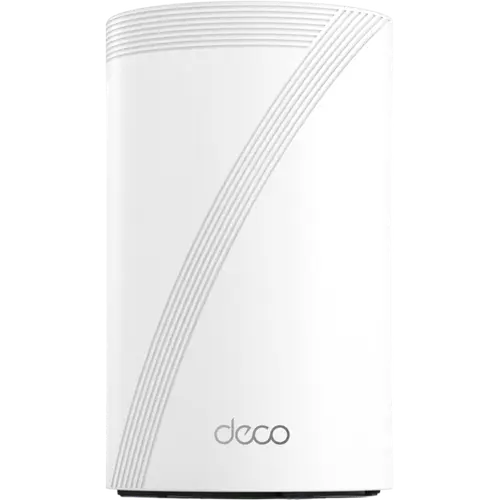
The TP-Link Deco BE67 is a tri-band Wi-Fi 7 mesh system built for larger homes that have outgrown a single router, pairing multi-gig wired backhaul with broad coverage and TP-Link's HomeShield parental controls. Most owners praise the speed, range and straightforward Deco app setup, while a smaller group ran into a stubborn satellite pairing, an occasional dead-on-arrival unit, or a fiddly process when promoting a different node to be the main router. It skips cross-vendor EasyMesh, Matter and Thread support and any WAN failover, so it suits buyers who want a fast, TP-Link-only mesh rather than an open smart-home hub. For a tri-band Wi-Fi 7 system with a genuinely full VPN suite, it lands as a strong value pick.
- Larger or multi-story homes
- Households upgrading to Wi-Fi 7
- Buyers who want a router-based VPN
- Smart-home setups with many IoT devices
Pros
- Tri-band Wi-Fi 7 speed (up to 14 Gbps combined) with 8 internal antennas across 2.4/5/6 GHz
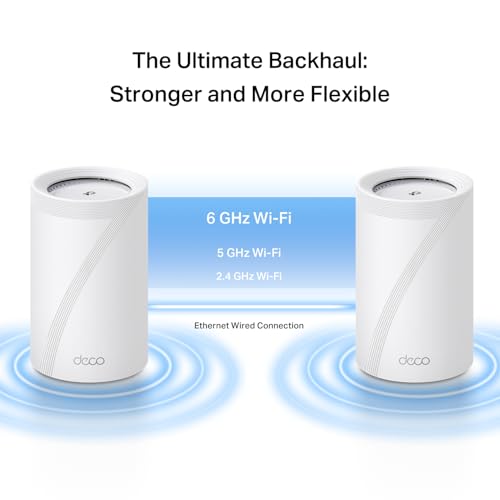
- Multi-gig wired backhaul, including a 10 Gbps port among its 3 network ports
- Full VPN suite: client and server with OpenVPN, WireGuard, L2TP/IPSec, PPTP and DDNS
- Strong parental controls and a dedicated IoT network for smart-home devices
- Easy Deco app setup, guest network, WPA3 encryption and access point mode
Cons
- Proprietary mesh standard, not the cross-vendor EasyMesh, so it only mesh-links with other Deco units
- No Thread border router or Matter controller for bridging Matter-over-Thread devices
- No multi-WAN, WAN failover or cellular backup for internet redundancy
- No LAN link aggregation for bonding ports
- Some buyers report inconsistent satellite pairing with certain devices and a fiddly main-unit-swap process
Who is the TP-Link Deco BE67 for?
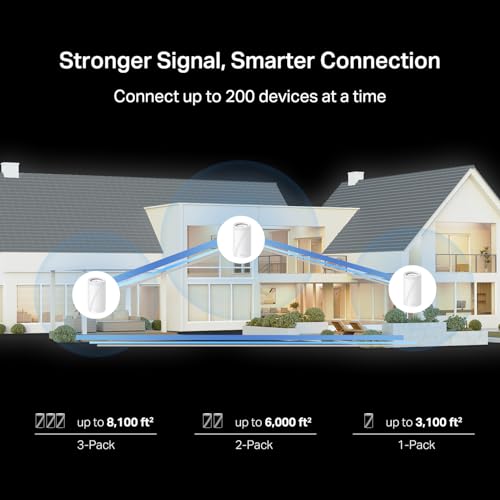
The Deco BE67 is a tri-band Wi-Fi 7 mesh system, sold as a single unit or in multi-packs, aimed at homes with dead zones or too many connected devices for one router to handle. Buyers who bought it to replace weak single routers or older mesh systems consistently report it closing coverage gaps across large, multi-story or oddly-shaped homes, with several owners confirming it reaches a back yard or a detached section of the property. Because it mixes into TP-Link's existing Deco lineup, it also suits anyone expanding an older Deco system rather than starting from scratch, since reviewers who paired it with older Deco units found the process straightforward.
What buyers love
The most consistent praise is for raw speed and stability once the system is running: owners on multi-gigabit fiber plans report hitting close to their full plan speed, and several specifically called out how much more stable it felt compared to the older Wi-Fi 6E router they replaced. The tri-band radio setup (2.4 GHz, 5 GHz and 6 GHz across 8 internal antennas) combined with Multi-Link Operation lets compatible devices use more than one band at once, which reviewers linked to smoother 4K streaming and lag-free local game streaming with many devices connected at once. Setup through the Deco app is repeatedly described as easy, even by buyers who call themselves non-technical, and the built-in speed test and per-device controls make day-to-day management simple. On the smart-home side, the dedicated IoT network, guest network and HomeShield parental controls (Wi-Fi pause schedules, instant pause and content blocking) came up as genuinely useful for households juggling many connected devices.
What to know before you buy
The complaints cluster around a handful of specific pain points rather than the core Wi-Fi performance. A few buyers described a unit that would not connect to their modem out of the box, and others found that some client devices could see the network but would not reliably connect to a satellite node, an issue reviewers only saw with certain devices rather than the whole network. Promoting a different Deco unit to be the main router is also flagged as more confusing than it should be, since the Deco app does not clearly walk through the steps. On the spec side, the mesh uses TP-Link's own proprietary system rather than the cross-vendor EasyMesh standard, so it only mesh-links with other Deco hardware. There is no Thread border router or Matter controller, so it will not natively bridge Matter-over-Thread smart home devices, and there is no multi-WAN, WAN failover or cellular backup, so a dropped primary connection has no automatic backup path. A couple of buyers also noted that TP-Link's deeper HomeShield security tier sits behind a subscription, even though the core parental controls do not.
Is the TP-Link Deco BE67 worth it?
For a tri-band Wi-Fi 7 mesh system with a 10 Gbps wired port, a genuinely complete VPN suite (client and server, OpenVPN, WireGuard, L2TP/IPSec and PPTP) and strong parental controls, the Deco BE67 lands as a solid mid-to-upper-tier pick rather than a flagship. Most buyers who kept it are satisfied with the speed and coverage for the price, and the occasional setup friction and satellite-pairing reports look like things to budget a little patience for rather than dealbreakers. Anyone who wants an open, cross-vendor mesh standard or built-in WAN redundancy should look elsewhere, but for a TP-Link household prioritizing speed, range and app-based control, it is a worthwhile upgrade.
Frequently asked questions
Does the TP-Link Deco BE67 support Wi-Fi 7?
Yes. It is a tri-band Wi-Fi 7 system that is also backward compatible with Wi-Fi 6E, Wi-Fi 6 and Wi-Fi 5 devices, with a combined theoretical speed up to 14 Gbps across its 2.4 GHz, 5 GHz and 6 GHz bands.
Can the Deco BE67 mesh with other TP-Link Deco routers?
Yes, it uses TP-Link's own Deco mesh system rather than the cross-vendor EasyMesh standard, so it links with other Deco units into one network; some owners have successfully paired it with older Deco models to extend an existing setup.
Does the Deco BE67 support a VPN?
Yes. It includes both a VPN client and VPN server with support for OpenVPN, WireGuard, PPTP and L2TP/IPSec, plus DDNS for remote access, a broader VPN feature set than most consumer mesh systems offer.
Does the Deco BE67 work with Matter or Thread smart home devices?
No. It does not act as a Thread border router and has no Matter controller, so it will not natively bridge Matter-over-Thread devices; it still offers a dedicated IoT network and guest network for segmenting smart-home traffic.
How many devices can connect to the Deco BE67?
TP-Link lists a maximum of 200 connected devices for the system, which buyers with many smart-home and streaming devices report handling without slowdowns.
Does the Deco BE67 have parental controls?
Yes, through TP-Link's HomeShield suite it includes Wi-Fi pause schedules, instant Wi-Fi pause and content blocking; some deeper HomeShield security features are subscription-based, per buyer reports.