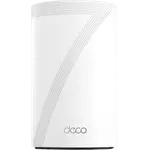


TP-Link Deco BE77 Review: A Fast, Easy Wi-Fi 7 Mesh That Rewards Going Multi-Node
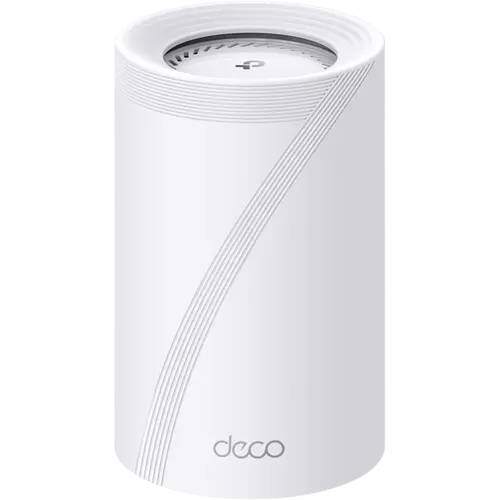
The Deco BE77 is a high-end tri-band Wi-Fi 7 mesh (BE17000) built around effortless app setup, strong multi-gig wired ports and 10 internal antennas. Owners repeatedly call the setup among the easiest they have done, praise the coverage and seamless roaming, and several rate it a clear upgrade over Eero, Asus or older Deco systems for stability and gaming. The main caveats are a premium per-unit price, a single node that can feel underwhelming in spaces that really want a second unit, and a consumer-first app that hides advanced controls, and a few owners hit MLO instability with the newest Apple devices. For buyers who want fast, hands-off Wi-Fi 7 mesh and will run more than one node, it is a strong pick.
- Large or multi-floor homes
- Hands-off, app-managed networks
- Multi-gig and 10G wired setups
- Upgrading from Eero, Asus or older Deco
Pros
- Tri-band BE17000 Wi-Fi 7 with MLO, 320 MHz channels and 10 internal antennas
- 10G RJ45/SFP+ combo port plus 2.5G and 1G ports per unit
- Very easy Deco app setup, praised even by non-technical buyers
- Strong coverage and seamless roaming across large homes
- Native separate IoT and guest networks
- Full VPN client and server, including WireGuard
- Can run as an access point behind an existing router
Cons
- Premium price per unit
- A single unit can underwhelm; it is built to shine as a multi-node mesh
- Consumer-focused app hides advanced controls (firewall, port forwarding, AP mode)
- Some owners report MLO instability with the newest iPhone and MacBook models
- A minority report setup trouble or occasional dropped connections
- Large footprint
Who is the TP-Link Deco BE77 for?
The Deco BE77 is a tri-band BE17000 Wi-Fi 7 system with 9 streams, 10 high-gain internal antennas, MLO and 320 MHz channels, aimed at people who want fast, future-proof mesh without fiddly configuration. Each unit carries a strong wired backbone: a 10G RJ45/SFP+ combo port, a 2.5G port and a 1G port, all WAN/LAN auto-sensing, plus a USB 3.0 port, and it supports up to 200 devices with roughly 3,300 sq ft of coverage per unit. Reviewers describe it as a natural fit for large or multi-floor homes, multi-gig internet plans, and anyone moving up from Eero, Asus, Omada or an older Deco or Google Wi-Fi mesh, with several specifically choosing it over the bulkier BE85 or the 8-antenna BE67.
What buyers love
Ease of setup is the most repeated praise: owners, including self-described non-technical buyers, call the Deco app setup quick and painless. Coverage and roaming come next, with people reporting strong signal throughout large homes and seamless handoff as they walk around, no cut-outs. Several reviewers switching from Eero Pro 7, Asus or TP-Link Omada say the BE77 fixed latency, gaming lag or roaming problems and has been rock solid, and a few note it holds full signal in wireless mesh mode where a smaller Deco struggled. Buyers also value the native separate IoT and guest networks (isolating smart-home gear without manual VLANs), the multi-gig 10G and 2.5G ports, the option to run it as an access point behind an existing router, and the built-in VPN client and server.
What to know before you buy
The BE77 is expensive per unit, and several owners point out that a single node can feel underwhelming in a smaller space, it is designed to shine as a multi-unit mesh, so budget for more than one node. The app is deliberately consumer-friendly, which power users find limiting: advanced firewall options, port forwarding and even access point mode are buried or sparse, and the local web interface is more limited than the app. A couple of owners hit MLO instability with the newest iPhone and MacBook models (turning MLO off resolves it), one notes it did not play nicely with every ISP, and a minority report setup trouble or dropped connections. It is also physically large and taller than systems like Eero. On the networking side there is no Matter controller or Thread border router.
Is the TP-Link Deco BE77 worth it?
For a large, device-heavy home where you will run two or three nodes and can use the multi-gig ports, the BE77 delivers fast, stable, genuinely hands-off Wi-Fi 7, and multiple owners rate it a clear step up from Eero and older mesh systems. It pairs that with a full VPN, guest and IoT feature set, wired backhaul and a 2-year warranty. Go in knowing it is a premium purchase best deployed as a mesh, and that the app trades advanced control for simplicity. For buyers who want speed and simplicity over deep configurability, it is a strong Wi-Fi 7 choice.
Frequently asked questions
Does the TP-Link Deco BE77 support Wi-Fi 7?
Yes. It is a tri-band BE17000 Wi-Fi 7 system with roughly 11530 Mbps on 6 GHz, 4324 Mbps on 5 GHz and 688 Mbps on 2.4 GHz, plus MLO (Multi-Link Operation) and 320 MHz channels. It is backward compatible with Wi-Fi 5, 6 and 6E devices.
What ports does the Deco BE77 have?
Each unit has one 10G RJ45/SFP+ combo port, one 2.5G port and one 1G port, all WAN/LAN auto-sensing, plus one USB 3.0 port. It supports wired Ethernet backhaul between units.
How many devices and how much area does the Deco BE77 cover?
TP-Link rates a single unit for up to 200 connected devices and around 3,300 sq ft of coverage. Add more Deco units to extend coverage into a larger mesh, which is how most owners get the best results.
Can the Deco BE77 run as an access point?
Yes. It supports access point mode to broadcast Wi-Fi behind an existing router or firewall, though the option is tucked away in the app and some advanced controls are reduced in that mode.
Does the Deco BE77 need a subscription?
Core features are free, including guest and IoT networks, basic parental controls, QoS and the built-in VPN. Some advanced HomeShield security and parental-control features require a paid subscription.
Does the Deco BE77 support VPN and WireGuard?
Yes. It works as both a VPN client and server and supports OpenVPN, PPTP, L2TP/IPSec and WireGuard, along with DDNS.