

TP-Link Deco X55 Review: The Easy Wi-Fi 6 Mesh That Kills Dead Zones on a Budget
The Deco X55 is the easy, affordable way to blanket a house in Wi-Fi 6. It is a dual-band AX3000 mesh unit rated for about 2,500 sq ft and 150 devices, with three Gigabit ports, wired Ethernet backhaul and an app that owners repeatedly describe as the least painful part of the whole process. The trade-offs are real but narrow: there is no 6 GHz band and no multi-gig port, so fast fiber plans and Wi-Fi 6E clients are better served higher up the range. For anyone replacing an ISP gateway or clearing dead zones in a multi-story home on a budget, it remains one of the safest picks in mesh Wi-Fi.
- Clearing Wi-Fi dead zones
- Replacing an ISP gateway
- Multi-story homes
- Budget Wi-Fi 6 mesh
- Expanding an existing Deco mesh
Pros
- App-guided setup that owners routinely finish in minutes
- Strong whole-home coverage, rated up to 2,500 sq ft per unit
- Expandable mesh that mixes with other Deco models
- Granular Deco app with per-device priority and a separate IoT network
- Three Gigabit WAN/LAN ports per unit with Ethernet backhaul support
- WPA3 encryption plus OpenVPN, PPTP and L2TP/IPSec VPN client and server
- Handles up to 150 connected devices
- Works as a standalone router or in access point mode
- Compact, unobtrusive design
Cons
- Dual-band only, with no 6 GHz band (not Wi-Fi 6E or Wi-Fi 7)
- Gigabit ports only, so multi-gig plans are capped by the wiring
- No USB port, so no network storage, FTP or Samba
- No WireGuard VPN support
- Not a Thread border router or Matter controller
- Coverage claims can be optimistic in homes with dense or block walls
- UK buyers report units arriving with a US power adapter
- Some owners report firmware updates upsetting a node or the mesh
Who is the TP-Link Deco X55 for?
The Deco X55 is the dual-band workhorse of the Deco line: AX3000 across 2.4 GHz (574 Mbps) and 5 GHz (2402 Mbps, with HE160), two internal antennas, 2x2 MU-MIMO and OFDMA, rated for roughly 2,500 sq ft and up to 150 connected devices per unit. Each unit carries three Gigabit WAN/LAN auto-sensing ports and supports wired Ethernet backhaul, and any unit can act as the main router or run in access point mode behind an existing gateway. Owners buy it for two jobs above all: replacing an ISP gateway whose Wi-Fi cannot reach the whole house, and adding one more node to a Deco mesh they already run. Several describe covering multi-story homes, basements, garages and even a detached workshop tens of feet from the house.
What buyers love
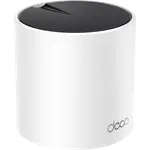
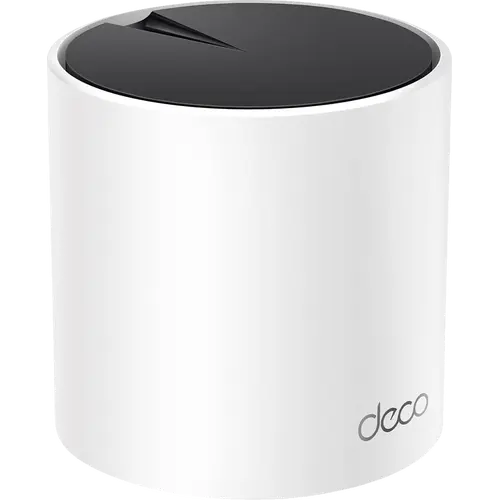
Setup is the single most praised thing about it. Owners repeatedly describe getting the network running in minutes with nothing but the Deco app, including people who say they had never touched a mesh system before, and adding further nodes is described as plugging one in and tapping a button. Coverage and stability come next, with buyers reporting dead zones disappearing across two-story homes and backyards, and clear improvements over ISP gateways and older extenders. The app draws praise well beyond setup, for letting owners monitor the network, give specific devices priority and spin up a separate IoT network for smart home gear, which lines up with the QoS, guest network and IoT network features on the spec sheet. The compact black-and-white cylinder also gets repeated compliments for disappearing into a room rather than announcing itself.
What to know before you buy
The biggest limitation is generational: the X55 is dual-band, so there is no 6 GHz band, no Wi-Fi 6E or Wi-Fi 7 support and no MLO, and at least one long-term owner moved up to a newer Deco specifically for that. Its three ports are Gigabit rather than multi-gig, so a fast fiber plan will be capped by the wiring rather than the radio, and there is no USB port, which rules out network storage, FTP and Samba. On the networking side there is no WireGuard VPN, and the unit is neither a Thread border router nor a Matter controller, so it will not serve as the hub of a Matter smart home. Coverage claims deserve a sanity check as well: one detailed critical account describes needing far more nodes than the advertised square footage suggested in a block-walled house, and another owner settled on four nodes plus a wired run for gaming. Buyers in the UK should look closely at the listing, since several report the unit arriving with a US two-pin power adapter, and a few report a firmware update leaving a node out of step with the rest of the mesh.
Is the TP-Link Deco X55 worth it?
For its intended job it is hard to argue with. This is a budget-tier mesh unit that delivers the two things most people actually want, coverage that reaches the whole house and a setup that does not require a networking background, backed by WPA3 encryption, a full VPN client and server stack, HomeShield parental controls and a two-year warranty. If you have a multi-gig connection, Wi-Fi 6E or Wi-Fi 7 clients, or you want the router to double as a smart home hub, spend more and move up the Deco range. If you simply want the dead zones gone without a project, this remains one of the easiest recommendations in mesh Wi-Fi.
Frequently asked questions
Is the TP-Link Deco X55 Wi-Fi 6E or Wi-Fi 7?
No. The Deco X55 is a dual-band Wi-Fi 6 system (AX3000) on the 2.4 and 5 GHz bands, with no 6 GHz band and no MLO. It does support HE160 wide channels, OFDMA and 2x2 MU-MIMO, and it stays backward compatible with Wi-Fi 5 and older clients.
How much area does one Deco X55 cover, and how many devices?
TP-Link rates a single unit for up to 2,500 sq ft and up to 150 connected devices. You can add more Deco units to extend the mesh, and owners in larger or block-walled homes often report needing more nodes than the square footage alone suggests.
What ports does the Deco X55 have?
Each unit has three Gigabit Ethernet ports with WAN/LAN auto-sensing, and it supports wired Ethernet backhaul between units. There is no USB port, so the system offers no network storage, FTP or Samba sharing.
Can the Deco X55 join a mesh with my existing Deco units?
Yes. It works in the same Deco mesh as other Deco models, any unit can serve as the main one, and it also runs in access point mode behind an existing router or ISP gateway.
Does the Deco X55 support VPN?
Yes, as both a client and a server, covering OpenVPN, PPTP and L2TP/IPSec, plus DDNS. WireGuard is not supported.
Can the Deco X55 act as a smart home hub?
Not as a protocol hub: it is not a Thread border router and not a Matter controller. It does offer a dedicated IoT network with device isolation and onboarding for TP-Link's own Tapo and Kasa devices.