


Sonos Beam (Gen 2) Review: The Compact Soundbar That Makes Dialogue Finally Make Sense
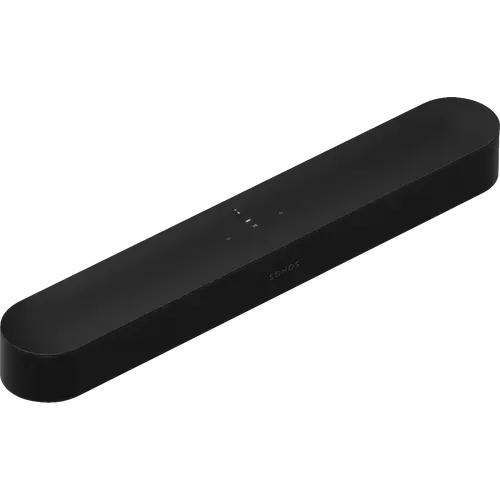
The Sonos Beam (Gen 2) is the compact soundbar to buy when TV dialogue is the problem and floor space is tight. Its center tweeter and speech enhancement mode draw consistent praise for making whispered and action-scene dialogue intelligible, and buyers repeatedly describe a soundstage far wider than the cabinet suggests. Dolby Atmos here is created by processing and side-firing drivers rather than upward-firing ones, so expect an enveloping bubble around the TV rather than true overhead effects, and expect to add a subwoofer for room-shaking bass. It is a premium purchase with no Bluetooth and room tuning limited to iOS, but for small and mid-sized rooms it is one of the most convincing soundbars of its size.
- Small and mid-sized living rooms
- Viewers who struggle with TV dialogue
- Sonos multi-room and home theater builders
- Buyers wanting Alexa or Sonos Voice Control built in
Pros
- Exceptionally clear dialogue thanks to the center tweeter and speech enhancement
- Wide, room-filling sound from a compact cabinet that fits under most TVs
- Fast, guided setup through the Sonos app
- Syncs with the TV remote and needs no remote of its own
- Expands into surround sound with other Sonos speakers and a Sub
- Alexa, Google Assistant and Sonos Voice Control built in, plus AirPlay 2 and Home Assistant support
Cons
- No Bluetooth, streaming is over Wi-Fi or AirPlay 2 only
- Trueplay room tuning requires an iOS device
- Dolby Atmos is processed and side-firing, not true overhead audio
- No HDMI inputs to pass other devices through, and no front display
- Deep low bass rolls off, a separate subwoofer is the usual upgrade
- 2.4GHz Wi-Fi only, and occasional HDMI eARC handshake issues with some TVs
Who is the Sonos Beam (Gen 2) for?
The Beam (Gen 2) targets people who want a serious audio upgrade over TV speakers without a full separates system or a soundbar that dominates the furniture. At roughly 65 cm wide and under 7 cm tall it fits under most TVs, and owners commonly report it filling rooms in the 15 to 20 square metre range comfortably. It connects to the TV over HDMI eARC (an optical adapter is included for older TVs), syncs with the TV remote through its infrared receiver so no extra remote is needed, and joins the wider Sonos system, so it also suits buyers planning to add a Sub or a pair of Era speakers for surround later. Voice control is built in through Amazon Alexa, Google Assistant and Sonos Voice Control, and it integrates with Google Home, Apple Home via AirPlay 2 and Home Assistant.
What buyers love
Dialogue clarity is the single most repeated theme: owners describe hearing every whispered line and following action scenes without reaching for the remote, which the center tweeter and the app's speech enhancement setting are built to deliver. The second theme is scale, with reviewers surprised that a cabinet this small throws sound well beyond the edges of the TV and produces usable bass without a subwoofer. Setup is regularly called effortless, often a few minutes through the Sonos app, and older buyers specifically mention having no trouble with it. Owners who already run Sonos gear praise how cleanly the Beam slots into an existing system, and the Trueplay room tuning is described as a genuine step change in bass balance and treble smoothness once run. The lack of a separate remote and of a visible subwoofer box is treated as a feature by buyers keeping clutter down.
What to know before you buy
There is no Bluetooth on this model, so phone audio arrives over Wi-Fi or AirPlay 2 rather than a direct pairing, and several buyers note this only after purchase. Trueplay room tuning requires a compatible iOS device, which Android owners repeatedly call out as frustrating, and the Sonos app itself draws mixed reviews, with some owners finding it basic or awkward for grouping speakers. The Atmos effect comes from processing and side-firing drivers rather than upward-firing ones, so reviewers describe a wide bubble of sound around the screen instead of true overhead placement. There are no HDMI inputs to pass other devices through, no front display, and deep low bass rolls off, so a Sub is the usual next purchase. A handful of owners also hit HDMI eARC handshake problems with specific TV models, and the far-field microphone occasionally misses a voice command.
Is the Sonos Beam (Gen 2) worth it?
Most owners conclude it is, provided the room matches the product. For a small or medium room where clear dialogue and a tidy setup matter more than physical surround channels, buyer feedback is consistently strong, with many describing it as the closest a single bar has come to their old multi-speaker systems. It is a premium-priced product and the full Sonos experience (surrounds plus a Sub) costs considerably more again, so buyers chasing floor-shaking bass or multiple HDMI inputs are better served elsewhere. As a compact, expandable centerpiece for a Sonos-based system, it holds up well against sustained owner feedback.
Frequently asked questions
Does the Sonos Beam (Gen 2) have Bluetooth?
No. It streams over 2.4GHz Wi-Fi and supports Apple AirPlay 2, and it also has an ethernet port for a wired connection, but there is no Bluetooth pairing.
Does the Beam (Gen 2) really do Dolby Atmos?
It decodes Dolby Atmos and creates height effects using processing and side-firing drivers rather than upward-firing speakers, so owners describe an enveloping bubble around the TV instead of sound placed directly overhead.
Do I need a subwoofer with the Sonos Beam (Gen 2)?
Not for normal viewing. Buyers regularly report usable bass on its own, but the lowest frequencies roll off, so a Sonos Sub or Sub Mini is the common addition for movie rumble.
Does it work with Alexa, Google Home, Apple Home and Home Assistant?
Yes. Amazon Alexa, Google Assistant and Sonos Voice Control are built in, and the speaker works with Google Home, Apple Home through AirPlay 2 and Home Assistant. Alexa and Google Assistant cannot be enabled on the same unit at once.
Can the Sonos Beam (Gen 2) be wall mounted?
Yes. It has a threaded mounting socket on the body, and Sonos and third parties sell dedicated wall and TV mounts separately.
Do I need an iPhone to set it up?
No, setup works from the Sonos app on Android or iOS, but the Trueplay room-tuning feature requires a compatible iOS device, which is a common complaint from Android owners.