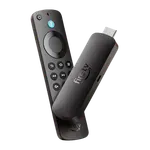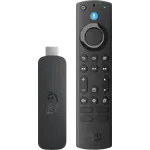


Amazon Fire TV Stick 4K Review: A Faster Stick Built Around Alexa+
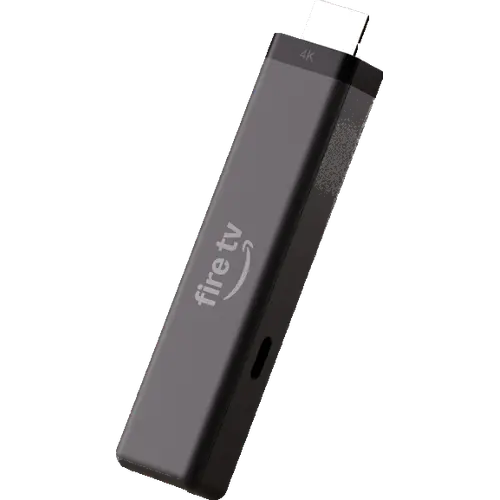
The Fire TV Stick 4K is a tidy, low-cost way to add 4K HDR streaming to a TV, with quick setup, Wi-Fi 6 and a much better-feeling remote. It is the right pick for an Alexa household that mostly watches the big services, but Vega OS limits it to the Amazon Appstore, and buyers report missing apps and uneven performance. If you sideload, use Google Cast or want Dolby Vision, spend more on the 4K Max or look at another platform.
- Alexa households
- Bedrooms and secondary TVs
- Travel and dorm rooms
- Simple 4K streaming
Pros
- Slim stick that can draw power from the TV's USB port
- Wi-Fi 6 and Bluetooth 5.3
- 4K HDR10 and HDR10+ with Dolby Atmos passthrough
- Redesigned remote with tactile keys, TV controls and a customizable star button
- Alexa+ voice search built in
- Quick setup and easy account linking
Cons
- Vega OS: Amazon Appstore only, no sideloading
- Buyers report missing apps, blank icons and app crashes
- Mixed reports on boot speed and everyday responsiveness
- No Dolby Vision, Wi-Fi 6E or built-in Ethernet
- No Google Cast or AirPlay, only Miracast mirroring
- Not a Matter device, and Home Assistant cannot control it
- Short 90-day warranty
Who is the Amazon Fire TV Stick 4K for?
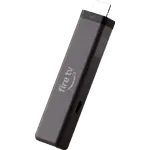
This stick suits a 4K TV that needs a faster, more current interface without adding another box to the stand. It plugs straight into HDMI, can draw power from the TV's USB port, and keeps the wiring behind the screen to a single short cable. The combination of Wi-Fi 6, 4K playback at up to 60 fps and HDR10+ is enough for the major streaming services, and Alexa+ voice search is useful if the rest of the house already talks to Echo devices. It is a good fit for a bedroom, guest room, dorm or a second TV, and its size makes it easy to pack for a trip.
What buyers love
The most common praise is how quickly the stick gets running. Many buyers describe a setup that takes minutes, with the stick already linked to their account and Wi-Fi details filled in, and several single out Direct Power as the reason they no longer need a wall adapter. The redesigned remote gets strong feedback too: its asymmetric shape, the metal home button and the sculpted keys are easier to find in the dark, the star button can be mapped to a favorite app, and the TV controls replace the set's own remote for power and volume. Some buyers also report noticeably faster navigation than their older Fire TV stick or their TV's built-in apps, and the 4K HDR picture draws positive comments when the source is good. At its price, especially when it is discounted, many consider it a strong value.
What to know before you buy
Vega OS is the main dividing line. The stick installs apps only from the Amazon Appstore, with no sideloading and no unknown sources, and reviewers report gaps: some services are missing, some apps show blank grey icons or fail to appear in the app bar, and tools such as Downloader or local-network players are limited or absent. Speed and stability are mixed in the same way: some owners call it fast and responsive, while others report slow boot times, lag when waking the TV, apps that crash and settings that feel cut back. The hardware is modest, with 8GB of storage and 1GB of RAM, so a large app library fills up and can slow the interface. There is no Dolby Vision, no Wi-Fi 6E and no built-in Ethernet; wired networking needs Amazon's USB-C adapter, sold separately. Casting is limited to Miracast, with no Google Cast or AirPlay. Alexa+ is included in a focused form, and full access across compatible Fire TV and Echo devices needs a Prime membership or an Alexa+ Standard plan. The 90-day warranty is short compared with the rest of the market. Smart home control runs through Alexa only: the stick is not a Matter controller or Thread border router, and Home Assistant cannot reach it because Vega OS has no Android Debug Bridge.
Is the Amazon Fire TV Stick 4K worth it?
For a viewer who lives inside the major apps and already uses Alexa, yes. It is one of the cheapest ways to get a current 4K streamer with Wi-Fi 6, HDR10+, Dolby Atmos passthrough, Bluetooth headphones and a genuinely improved remote, and the Direct Power design makes it easy to move between TVs. The value falls apart for anyone who sideloads, relies on a missing service, wants Google Cast or AirPlay, or needs the extra headroom of 16GB of storage and Wi-Fi 6E. Those buyers are better served by the Fire TV Stick 4K Max or by a Google TV or Apple TV device, while this stick remains a sensible, affordable upgrade for a secondary 4K screen.
Frequently asked questions
Does the Fire TV Stick 4K support Dolby Vision?
No. It supports HDR10, HDR10+ and HLG. Dolby Vision is available on the Fire TV Stick 4K Max.
Do I need a wall adapter for the Fire TV Stick 4K?
Not normally. Direct Power lets it run from the TV's USB port with the included cable. If that port does not supply enough power, use a wall adapter or a longer cable, sold separately.
Can I sideload apps on the Fire TV Stick 4K?
No. Vega OS installs apps only from the Amazon Appstore and blocks unknown sources, so Android APKs and unofficial players cannot be added.
Does the Fire TV Stick 4K work with Alexa?
Yes. A focused Alexa+ experience is built in, the remote has a push-to-talk microphone, and the stick can be controlled from Echo devices. Full Alexa+ access across devices needs a Prime membership or an Alexa+ Standard plan, and hands-free voice needs a linked Echo because the stick has no far-field microphones.
Does it work with Google Home, Apple Home, SmartThings, Matter or Home Assistant?
No. Fire TV is controlled through Alexa. This model is not a Matter device or a Thread border router, and Home Assistant cannot reach it because Vega OS has no Android Debug Bridge.
Can I use Ethernet with the Fire TV Stick 4K?
Only with Amazon's USB-C Ethernet adapter, sold separately. The stick has no built-in Ethernet port, and its USB-C port is otherwise used for power.