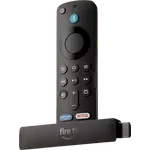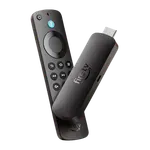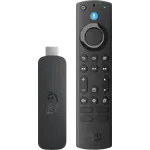


Amazon Fire TV Stick HD Review: The Slim Stick That Turns an Old HD TV Smart Again
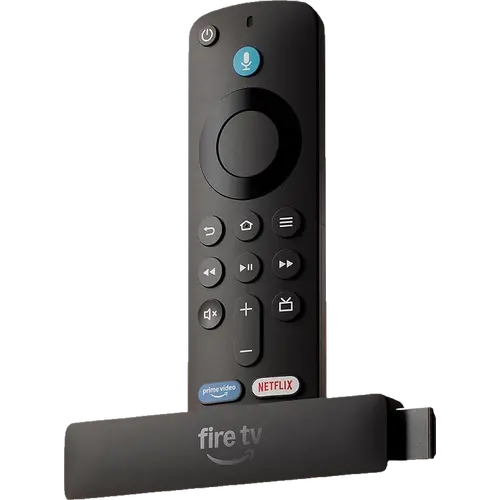
The Fire TV Stick HD is the simplest way to put a modern app catalog on a 1080p TV or monitor: it plugs into HDMI, can draw power from the TV's own USB port, and runs Prime Video, Netflix, YouTube, Disney+ and the other big services smoothly over Wi-Fi 6. Its trade-off is Vega OS, Amazon's new Linux-based system, which only installs apps from the Amazon Appstore and still lacks some services and local media tools. For a bedroom, guest room or aging TV it is excellent value; anyone who sideloads apps or streams from a NAS should look at a Fire OS or Google TV device instead.
- Reviving an older HD TV
- Bedrooms and guest rooms
- Budget buyers
- Alexa homes
- Travel and second screens
Pros
- Very quick, simple setup
- Smooth, responsive navigation on dual-band Wi-Fi 6
- Can be powered from the TV's USB port, no wall adapter needed
- HDR10, HDR10+ and HLG plus Dolby Atmos passthrough
- Alexa Voice Remote controls TV and soundbar power and volume
- Very slim and light, easy to take on the road
Cons
- Vega OS: Amazon Appstore only, no sideloading
- Some apps are missing or limited compared with Fire OS
- Some TVs' USB ports do not supply enough power, and the included cable is short
- Full HD only, with no Dolby Vision
- No Ethernet port, AirPlay or Google Cast
- Short 90-day warranty
Who is the Amazon Fire TV Stick HD for?
It is built for HD screens: the stick outputs 1080p at up to 60 fps, so it suits TVs under roughly 50 inches, computer monitors with an HDMI input and older sets whose built-in apps stopped being updated. That last case is the one buyers on every Amazon marketplace describe most often, from a Sony Bravia that lost its smart features to TVs that could no longer install a streaming service, and even a CRT set driven through an HDMI-to-SCART converter. At 91.5 x 21.1 x 14.5 mm and 35.8g it is Amazon's slimmest stick, and with Direct Power it can run from the TV's USB port with the included short USB-C cable, which makes it easy to move between rooms or pack for a trip.
What buyers love
Setup is the most praised point: owners report being up and running in minutes, often with the stick already registered to their Amazon account and their Wi-Fi details filled in. Many say navigation feels faster and smoother than their older Fire TV sticks or their TV's own smart platform, which matches the quad-core 1.7 GHz processor and dual-band Wi-Fi 6. Running it from the TV's USB port means one less plug and fewer cables behind the screen, something several buyers single out. The Alexa Voice Remote also earns steady praise for finding shows by voice and for controlling the TV's power and volume, so the TV remote can often stay in a drawer, and value for money comes up again and again.
What to know before you buy
The switch to Vega OS is the recurring complaint. Apps come only from the Amazon Appstore, sideloading is not possible, and buyers report specific gaps: CNN missing in the US, audio out of sync on RaiPlay in Italy, a reworked VLC app that will not connect to a NAS, Spotify behaving differently from the previous model and no route for IPTV players. Some TVs do not supply enough power over USB, so a few owners had to plug the stick into a wall adapter, which is sold separately, and the included cable is only 1.3 ft long. A handful of buyers whose TV brand was missing from the remote setup list could not use the TV controls. There is no Dolby Vision (that needs the 4K sticks), no Ethernet port without Amazon's USB-C adapter, no AirPlay or Google Cast, only Miracast mirroring, and the warranty is 90 days. Home Assistant cannot control it either, since Vega OS has no ADB access.
Is the Amazon Fire TV Stick HD worth it?
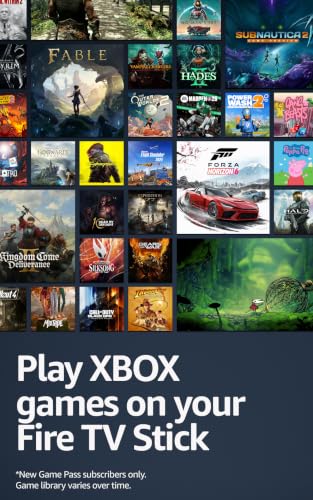
For a 1080p screen and a viewer who lives in the mainstream apps, yes. It is one of the cheapest ways to get a fast, current streaming interface with HDR10, HDR10+ and HLG, Dolby Atmos passthrough to a soundbar, Bluetooth headphones and controllers, and cloud gaming through Amazon Luna and Xbox Game Pass. Check first that every app you rely on exists for Vega OS, and skip it if you sideload, stream local files from a NAS or have a 4K TV, where the Fire TV Stick 4K line makes more sense.
Frequently asked questions
What is the difference between the new Fire TV Stick HD and the previous model?
The new Fire TV Stick HD runs Vega OS instead of Fire OS, moves from micro-USB to USB-C with Direct Power from the TV's USB port, upgrades from Wi-Fi 5 to dual-band Wi-Fi 6 and from Bluetooth 5.0 to 5.3, and is slimmer. It keeps 8GB of storage and 1080p output.
Can you sideload apps on the Fire TV Stick HD?
No. Vega OS only installs apps from the Amazon Appstore, so Android APKs and unofficial IPTV players cannot be added. The major services such as Prime Video, Netflix, YouTube, Disney+, Hulu and HBO Max are available.
Does the Fire TV Stick HD need a wall adapter?
Not always. It ships with a short USB-C cable to run from the TV's USB port. If that port does not supply enough power, a wall adapter (sold separately) or a longer cable to an outlet is needed.
Does the Fire TV Stick HD support 4K or Dolby Vision?
No. It outputs up to 1080p at 60 fps and supports HDR10, HDR10+ and HLG. Dolby Vision and 4K require one of the Fire TV Stick 4K models.
Does the Fire TV Stick HD work with Alexa and Home Assistant?
Alexa is built into the included voice remote and works from Echo devices too, and the remote controls power and volume on compatible TVs and soundbars. Home Assistant cannot control it, because Vega OS has no Android Debug Bridge access. It is not a Matter controller or a Thread border router.
Can I play games on the Fire TV Stick HD?
Yes, through cloud gaming. It pairs Bluetooth game controllers and supports Amazon Luna and Xbox Game Pass, which need their own subscriptions.