Image Slideshow Items

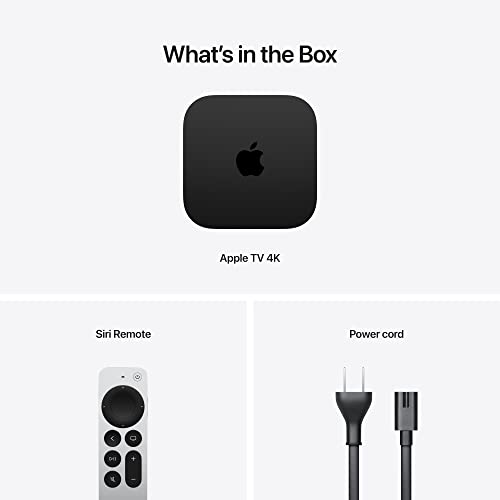
  • Apple TV 4K (3rd Gen, Wi-Fi + Ethernet 128GB)
  • Apple TV 4K (3rd Gen, Wi-Fi + Ethernet 128GB) photo 2
  • Apple TV 4K (3rd Gen, Wi-Fi + Ethernet 128GB) photo 3
  • Apple TV 4K (3rd Gen, Wi-Fi + Ethernet 128GB) photo 4
  • Apple TV 4K (3rd Gen, Wi-Fi + Ethernet 128GB) photo 5

Apple TV 4K (3rd Gen, Wi-Fi + Ethernet 128GB)

A15 Bionic speed, Dolby Vision, HDR10+ and Dolby Atmos, Gigabit Ethernet and a built-in Thread border router, at a premium price.

4.7
1,624 ratings

4.7 vs the 4.4 average of 10 streaming devices we track

Last recorded price

Currently unavailable on Amazon USA

As an Amazon Associate I earn from qualifying purchases
Launch Year: 2022

Model: A2843

Open selection
Works with
  • Apple HomeKit
  • Home Assistant
Connectivity
  • Wi-Fi 2.4/5 GHz
  • Ethernet
  • Thread border router
  • Bluetooth
Deals by email

Not buying today? Get the best deals by email

We follow prices across the catalog and email you the best deals we find.

Smart home deals and news, straight to your inbox

Price drops, new releases and the smart home news worth knowing.

No spam. Unsubscribe in one click.

Your subscription could not be saved. Please try again.
Please enter a valid email address.
Tick the box above to finish signing up.
We couldn't verify you're human. Please try again.
Too many attempts. Please try again in an hour.
Your subscription has been successful.
Our review

Apple TV 4K (3rd Gen) Review: The Fastest, Cleanest Streamer That Also Runs Your Apple Home

The verdict

The Apple TV 4K Wi-Fi + Ethernet (3rd generation) is the streamer to buy if you want the smoothest interface and the widest HDR support in one box: Dolby Vision, HDR10+, HLG and Dolby Atmos, with Gigabit Ethernet and 128GB of storage. It doubles as an Apple Home hub, a Matter controller and a Thread border router, which no stick can match. The trade-offs are a premium price, no Google Cast and no hands-free voice, and it pays off most in a home that already runs on iPhones.

Best for
  • Apple households
  • Home theater fans
  • Apple Home and Thread users
  • Smart TV replacement

Pros

  • Very fast, fluid interface thanks to the A15 Bionic
  • Dolby Vision, HDR10+, HLG and Dolby Atmos support
  • Apple Home hub, Matter controller and Thread border router built in
  • Gigabit Ethernet and 128GB of storage
  • Rechargeable USB-C Siri Remote that also controls the TV
  • Pairs with Xbox and PlayStation controllers for games

Cons

  • Premium price compared with streaming sticks
  • No Google Cast or Miracast, AirPlay only
  • No hands-free voice and no USB port
  • Occasional reports of HDR10+ playback hiccups and remote failures

Who is the Apple TV 4K (3rd Gen) for?

It is built for people who already own an iPhone, iPad or Mac: setup takes a few minutes with a phone nearby, AirPlay sends video and photos to the TV, and the box becomes the hub of an Apple Home. Many buyers bought it to replace the slow, ad-heavy interface of their smart TV, a cable or satellite box, an old media PC or a games console used for streaming, and say the difference is night and day. Home theater owners pair it with projectors, soundbars and AV receivers for Dolby Vision and Dolby Atmos.

What buyers love

Speed is the recurring theme: the A15 Bionic keeps menus, app switching and playback fluid even years after launch, where Android-based boxes and built-in TV systems tend to stutter. Owners praise the picture and sound quality, the clean home screen without advertising tiles, and frame rate and dynamic range matching that just works. The Siri Remote turns the TV on and switches its input over HDMI-CEC, the Wi-Fi connection is described as stable, and the App Store adds games that run with Xbox or PlayStation controllers. One owner who moved from a games console also points out how little power it draws while streaming.

What to know before you buy

It speaks AirPlay, not Google Cast or Miracast, so Android phones and Windows laptops cannot cast to it natively. There is no USB port and no microphone on the box itself, so voice control means holding the Siri button on the remote. A few owners mention a short playback pause with HDR10+ and frame rate matching enabled, a remote that failed, a duller home screen than they expected, or a regional TV app missing from the App Store. Thread, Gigabit Ethernet and the 128GB of storage are exclusive to this Wi-Fi + Ethernet model; the 64GB Wi-Fi version has none of the three.

Is the Apple TV 4K (3rd Gen) worth it?

Yes, if you value a fast, polished experience and live in the Apple ecosystem. It sits at the premium end of streaming devices, and buyers consistently call it worth the money because it outlasts and outperforms cheaper sticks and built-in TV platforms. The Wi-Fi + Ethernet model is the one to choose: the wired port and the Thread border router make it a reliable always-on smart home hub, not just a streamer.

Frequently asked questions

Is the Apple TV 4K (3rd Gen) a Thread border router?

Yes, the Wi-Fi + Ethernet model with 128GB has Thread built in and works as a Thread border router and Apple Home hub. The 64GB Wi-Fi model does not include Thread.

Can the Apple TV 4K control Matter devices?

Yes. It acts as a Matter controller and Home hub for the Apple Home app, so Matter and HomeKit accessories keep running automations and can be controlled remotely while you are away.

Does the Apple TV 4K support Dolby Vision and HDR10+?

Yes. It outputs 4K at up to 60 fps in Dolby Vision, HDR10+, HDR10 and HLG, and passes Dolby Atmos audio to a compatible soundbar or receiver.

Can I cast from an Android phone to the Apple TV 4K?

Not natively. It supports AirPlay from iPhone, iPad and Mac, but not Google Cast or Miracast.

Does the Apple TV 4K work with Home Assistant?

Yes. The official Home Assistant Apple TV integration controls it as a media player and remote, with keyboard input.

Can I play games on the Apple TV 4K?

Yes. It pairs with up to four Bluetooth controllers, including Xbox Wireless, PlayStation DualShock 4 and DualSense, for games from the App Store and Apple Arcade.


At a glance

Summary

Everything this streaming device supports, grouped by category.

Size & Materials
3.7 × 3.7 × 1.2 in (93 × 93 × 31 mm)7.5 oz (214 g)
Hardware
BoxtvOS128GB
Audio & Video
4KHDR10HDR10+Dolby VisionHLGDolby Atmos
Connectivity
2.4 GHz WiFi5 GHz WiFiEthernetBluetooth
Integrations
Apple HomeKitHome Assistant
Smart Home Hub
Matter ControllerThread Border Router
Casting
AirPlay
Remote
Voice RemoteTV ControlsRechargeable RemoteRemote Finder
Voice Control
Siri
Features
Game Controller Support

Price History

Loading price history...

Price alert

Get an email when the price drops

How much should it drop?

Cancel anytime from the email.

Company
Apple logo

Apple

4.7/ 5 avg ratingUSA flagHeadquartered in USA

Apple brings smart home control to its ecosystem through the Home app and the HomeKit and Matter standards, with the HomePod and Apple TV acting as home hubs. Apple's approach emphasizes privacy, local processing and tight integration with iPhone, iPad and Siri. HomeKit-compatible accessories appeal to users who want a secure, Apple-centric smart home without relying on the cloud.

Full specifications

Every spec, organized

Browse the full breakdown by category. Tap the on any row for what it means, or the for sources and documentation.

Size & Materials
Dimensions

3.7 × 3.7 × 1.2 in (93 × 93 × 31 mm)

Weight

7.5 oz (214 g)

Hardware
Form Factor

Box

Operating System

tvOS

Storage

128GB

Audio & Video
Max Resolution

4K

HDR10

YES

HDR10+

YES

Dolby Vision

YES

HLG

YES

AI Upscaling

NO

Dolby Atmos

YES

Connectivity
2.4 GHz WiFi

YES

802.11ax Wi-Fi 6 with MIMO, simultaneous dual band (2.4GHz and 5GHz).

5 GHz WiFi

YES

802.11ax Wi-Fi 6 with MIMO, simultaneous dual band (2.4GHz and 5GHz).

6 GHz WiFi

NO

Wi-Fi 6 (802.11ax), not Wi-Fi 6E: the radio works on the 2.4GHz and 5GHz bands only.

Ethernet

YES (Gigabit)

Gigabit Ethernet is only on the Wi-Fi + Ethernet (128GB) model; the 64GB Wi-Fi model has no Ethernet port.

Bluetooth

YES (5.0)

USB

NO

Integrations
Google Home

?

Alexa

?

Apple HomeKit

YES

Apple TV 4K shows up in the Apple Home app and acts as a home hub for HomeKit and Matter accessories.

Samsung SmartThings

?

Home Assistant

YES

The official Home Assistant Apple TV integration controls any Apple TV generation (media player, remote, keyboard).

Matter

NO

Apple TV is certified by the CSA as a Matter controller (tvOS software component), not as a Matter device that other ecosystems can add and control.

Smart Home Hub
Matter Controller

YES

Works as a Home hub that controls Matter accessories; tvOS is CSA certified as a Matter controller.

Thread Border Router

YES

Thread networking is built into the Wi-Fi + Ethernet model, which Apple names as a Thread-enabled home hub.

Casting
AirPlay

YES

Google Cast

NO

Screen Mirroring (Miracast)

NO

No Miracast; screen mirroring from Apple devices goes through AirPlay.

Remote
Voice Remote

YES (Siri)

TV Controls

YES

The Siri Remote powers the TV on and off, switches input and controls volume over IR or HDMI-CEC.

Backlit Buttons

NO

Rechargeable Remote

YES (USB-C)

Remote Finder

YES (via iPhone)

With iOS 17 and tvOS 17 or later, the Apple TV Remote in an iPhone's Control Center can locate the Siri Remote (2nd generation or later) by proximity; the remote does not play a sound.

Programmable Buttons

NO

Voice Control
Voice Assistant

Siri

Hands-Free Voice

NO

Features
Game Controller Support

YES

Pairs with up to four Bluetooth controllers: Xbox Wireless, PlayStation DualShock 4 and DualSense, and MFi controllers.

On sale now

3 other Streaming Devices on sale

View all
Full comparison table

Compare the Apple TV 4K (3rd Gen, Wi-Fi + Ethernet 128GB) with the other 9 Streaming Devices

All Streaming Devices in the catalog in one table: filter by what you need, sort by price or rating, and see exactly where this one lands.

  • 9 other Streaming Devices
  • 43 specs compared
  • 40 filters
Open the full comparison
Head to head

Apple TV 4K (3rd Gen, Wi-Fi + Ethernet 128GB) vs the competition

View all
Apple

More from Apple

View all