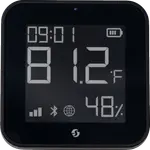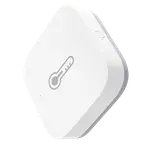
Sonoff SNZB-02UL AirGuard E-Ink TH Review: A Paper-Like Zigbee Sensor You Can Read Across the Room
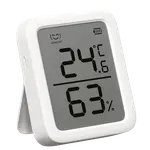
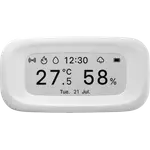
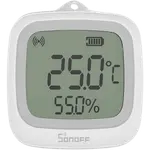
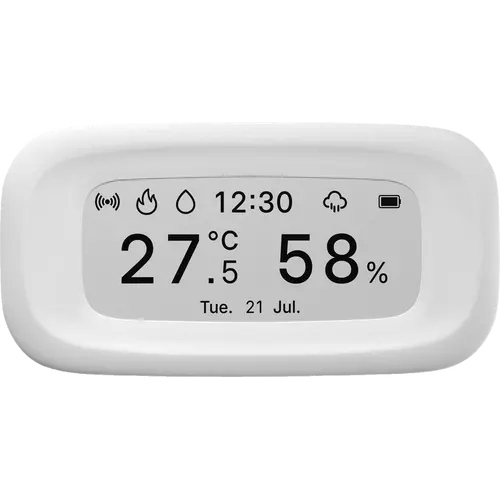
The Sonoff SNZB-02UL AirGuard E-Ink TH is a Zigbee 3.0 temperature and humidity sensor built around a 2.9 inch E-Ink display that reads like printed paper, from any angle and in bright light. Buyers single out two things: how much easier it is on the eyes than an LCD sensor, and its ability to show the reading of a second sensor on the same screen. It runs on two ordinary AAA cells, carries six hours of history on the device and six months of temperature, humidity, dew point and VPD in the app or Home Assistant. The trade-off is that the smart half needs a Zigbee gateway or Home Assistant, and getting the weather, time and remote sensor features running in Home Assistant takes a quirk and a couple of blueprints.
- Zigbee and Home Assistant homes
- Rooms where a reading must be visible at a glance
- Replacing coin-cell LCD sensors
- Kitchen, cellar, office and greenhouse monitoring
One sensor per room you want to read.
Buy on Amazon USACheck pricePros
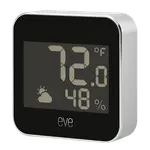
- 2.9 inch E-Ink screen that is crisp and readable from any angle, even in bright light
- Can show a second supported Sonoff sensor's temperature and humidity on the same screen
- Weather icon, time and date appear once it is connected to a gateway or Home Assistant
- Six hours of history on the device and up to six months of temperature, humidity, dew point and VPD in the app or Home Assistant
- Runs on two standard AAA batteries, supplied, instead of a coin cell
- Zigbee 3.0 sensor that pairs with Home Assistant, Alexa, Google Home and SmartThings, and reaches Apple Home through a Sonoff Matter bridge
- Four mounting options: built-in magnet, fold-out stand, wall mount and adhesive pad
- Sensirion sensor rated to plus or minus 0.2 C and plus or minus 2% RH, with calibration offsets in the app
Cons
- The time, date, weather, alerts and remote sensor display all need a Zigbee gateway or Home Assistant; standalone it shows only temperature, humidity and history
- Home Assistant setup needs Sonoff's script for ZHA and a quirk plus blueprints for Zigbee2MQTT before the advanced features work
- Glossy front glass can create reflections that hurt readability from some angles
- The history button is on the back, hard to reach once the sensor is wall-mounted or stuck down
- E-Ink does a visible full refresh as it updates, which can be distracting on a desk
- No Thread support, and indoor use only with no IP rating
Who is the Sonoff SNZB-02UL AirGuard E-Ink TH for?
This is the display-first member of Sonoff's AirGuard family, and it is aimed at two kinds of buyer. The first already runs a Zigbee coordinator, whether a Sonoff bridge, an Echo with a built-in hub or Home Assistant, and wants a number that can be read from across a room without opening an app. The second wants a sensor that keeps working on its own: with no hub at all it still shows temperature, humidity and the past six hours on a button press, and the E-Ink panel draws so little power that the two supplied AAA cells are rated to last well over a year in that mode. Its size, at roughly 99 by 51 mm, and the white finish let it sit on a nightstand, a shelf or a fridge door without looking like a glowing gadget. Reviewers put it in kitchens, offices, cellars, bedrooms, server cupboards, greenhouses and even inside a fridge, often pairing it with a second Sonoff sensor so both readings share the screen.
What buyers love
The display is the theme that runs through almost every review. Buyers describe the E-Ink panel as crisp, high contrast and paper-like, readable from any angle and in bright light, and several note it looks far nicer and less obtrusive than the LCD screens on the sensors they already own. Just behind it comes the remote sensor display: enable it on a compatible gateway or in Home Assistant and one of the supported Sonoff sensors can send its temperature and humidity to this screen, which owners use to watch an outdoor probe or a second room from one spot. The two AAA batteries are a recurring, and slightly unusual, selling point, with reviewers preferring them to coin cells for both life and availability, and the claimed eight to fifteen months depending on whether it is connected. Owners also praise how quickly it pairs with Home Assistant through ZHA or Zigbee2MQTT, how accurate the Sensirion readings are against their other instruments, and the calibration offsets in the app. The mounting set gets its share of praise too: a built-in magnet, a fold-out stand, a wall option and an adhesive pad cover nearly any surface.
What to know before you buy
The most important caveat is the gateway. Standalone, the screen shows only temperature and humidity plus the six-hour history; the time, date, weather icon, comfort alerts, remote sensor display and automations all need a Zigbee gateway or Home Assistant, and buyers who expected it to join their Wi-Fi directly had to set up a Zigbee hub first. In Home Assistant the device is new enough that the advanced features take a little work: ZHA needs a script from Sonoff's help center, and Zigbee2MQTT needs a recent build plus a quirk and two blueprints for the remote sensor and weather data, at least until the device reaches Home Assistant Core. The other complaint that comes up more than once is the glossy cover over the E-Ink panel, which can catch reflections and dull the readability that E-Ink normally wins on; a matte finish would have matched the paper feel better. Owners also point out that the button for the history pages sits on the back, which is awkward once the sensor is wall-mounted or stuck down, and that reaching the battery door behind an adhesive mount is fiddly. Two smaller notes: the E-Ink screen does a visible full refresh as it updates, which some find distracting on a desk, and there is no Thread support, so it is a Zigbee-only device. It is also indoor only, with a rated range of 0 to 50 C and no IP rating, so a bathroom or greenhouse can be fine but a wet outdoor spot is not.
Is the Sonoff SNZB-02UL AirGuard E-Ink TH worth it?
For a Zigbee household that wants readings on a wall as well as in a dashboard, it is easy to recommend. You are paying a budget price for a large E-Ink display, a Swiss Sensirion sensor rated to plus or minus 0.2 C and plus or minus 2% RH, six months of exportable history with dew point and VPD, and batteries that are already in the box. What you give up against a screenless sensor is nothing but money, and what you give up against a pricier AirGuard is the barometer; what you have to accept is that the smart features live behind a Zigbee gateway, and that the first Home Assistant setup asks for a little patience. Buyers who want a reading they can glance at without a phone, or a display that can borrow a second sensor's numbers, will get the most out of it. Anyone who needs an outdoor-rated probe, a barometer, or a sensor that runs over Thread should look at another model in the range.
Frequently asked questions
Does the Sonoff SNZB-02UL need a hub?
Not for a basic reading. Standalone it shows temperature, humidity and the past six hours on its screen. A Zigbee 3.0 gateway or Home Assistant is what unlocks the time, date, weather icon, comfort alerts, remote sensor display and smart scenes. Sonoff lists the ZBBridge-P, ZBBridge-U, Bridge-M, NSPanel Pro and iHost as its own gateways, plus the Aeotec SmartThings Hub V3 and the Zigbee Echo models.
What can it show without a gateway?
Temperature and humidity update live, and a button press brings up the recorded temperature and humidity for the previous six hours. Everything else on the screen, including the clock, the date and the weather icon, requires a gateway or Home Assistant.
Does it work with Home Assistant?
Yes. It works through ZHA and Zigbee2MQTT. Basic temperature, humidity and battery entities come through quickly, while the remote sensor display and weather data need the script Sonoff publishes in its help center for ZHA, or a recent Zigbee2MQTT build with the quirk and blueprints for Z2M. Owners report that the device is not yet in Home Assistant Core, so this setup step is expected for now.
Can it display the temperature from another sensor?
Yes. With remote temperature and humidity enabled, one supported sensor on the same Sonoff gateway, or an entity in Home Assistant, can be shown on the SNZB-02UL screen alongside its own reading. The supported sources are the SNZB-02P, SNZB-02D, SNZB-02WD, SNZB-02LD, SNZB-02DR2, SNZB-02B, SNZB-02M and SNZB-02UL.
What batteries does it use and how long do they last?
Two LR03 AAA cells, which are included and already fitted. Sonoff rates them at more than eight months when the sensor is connected to a gateway and more than fifteen months when it is used standalone, since the E-Ink panel uses almost no power. Those are laboratory figures and real life depends on how often the display refreshes and how far the device sits from its coordinator.
Can it be used outdoors?
It is specified for indoor use, with a working range of 0 to 50 C and 5 to 95% RH non-condensing, and Sonoff publishes no IP rating. A sheltered spot such as a greenhouse or a covered porch may work in practice, but for a genuinely wet location the IP65 SNZB-02WD is the model built for it.