





Google Nest Thermostat Review: Affordable Smart Heating That Pays for Itself
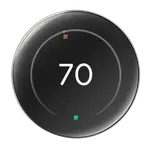
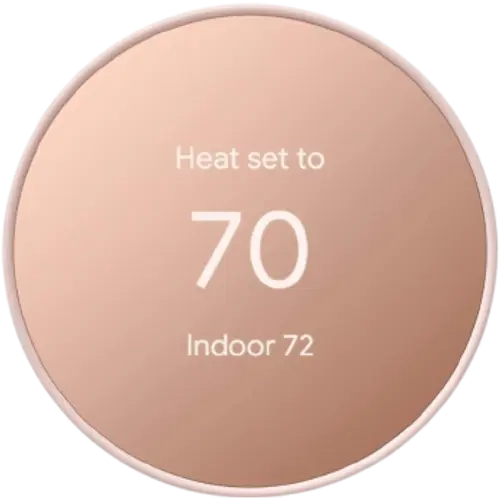
The Google Nest Thermostat is the budget member of the Nest family, and a strong value: easy app control from anywhere, automatic scheduling and an eco/away mode that uses your phone's location and a motion sensor to save energy, often cutting heating bills by $25 to $35 a month and paying for itself within a season (especially with a utility rebate). It has a clean display showing temperature, weather and time, works with Google Home, Alexa, Apple HomeKit, SmartThings and IFTTT, and installs in about 30 minutes. The trade-offs: it needs a C-wire (or an adapter), it uses a less intuitive side touch strip instead of the premium Learning model's dial, it is managed only through the Google Home app, the eco mode can be over-aggressive, and it is North-America-only (not UK/EU) with no Matter or remote sensors. For affordable, hands-off smart climate control in a Google home, it delivers.
- Budget smart-thermostat buyers
- Google / Nest households
- Energy savers (with rebates)
- Upgrading old manual thermostats
Pros
- Affordable, and often pays for itself with energy savings and utility rebates
- Easy app control from anywhere, with automatic scheduling
- Eco/away mode uses phone location and a motion sensor to cut waste
- More accurate, consistent temperature control than old thermostats
- Works with Google Home, Alexa, Apple HomeKit, SmartThings and IFTTT
- Sleek display showing temperature, weather and time; quick ~30-minute install
Cons
- Requires a C-wire (or Nest's adapter)
- North-America-only; not compatible with UK/EU systems
- Managed through the Google Home app only (no Nest app)
- Eco mode can be over-aggressive and fiddly to adjust
- Less premium side touch strip vs the Learning model's dial; no remote sensors
- Supports 2-stage heat or cooling but not both; no Matter
Who is the Google Nest Thermostat for?
This is the affordable, entry-level Nest thermostat for people who want app control and energy savings without the premium price. It has a 2.4-inch color display (controlled by a side touch strip rather than the Learning model's rotating dial) that shows temperature, weather and time, and uses occupancy, motion, temperature, humidity and ambient-light sensing for an eco/away mode that adjusts when no one is home. It connects over Wi-Fi, supports automatic scheduling and energy reports, and works with Google Home, Amazon Alexa, Apple HomeKit, Samsung SmartThings and IFTTT (no Matter, and Home Assistant only partially). Unlike the Nest Learning Thermostat, it does not support remote sensors and is less of a true learning device. It requires a C-wire (or Nest's adapter) and is designed for North American HVAC. It best suits budget buyers, Google/Nest households, energy savers (often helped by a utility rebate), and anyone upgrading an old manual or unprogrammed thermostat.
What buyers love
Value and savings lead the praise. Owners replacing old dial or never-programmed thermostats report real cuts in heating bills (commonly $25 to $35 a month), and several note a utility rebate (around $50) that made it nearly free, so it pays for itself within a season. The convenience of controlling it from a phone anywhere, pre-heating or pre-cooling before getting home, and keeping the house cooler while away is repeatedly called the best part. The automatic scheduling and eco/away mode, which uses phone location and the motion sensor to detect occupancy (including noticing when someone is unexpectedly home), genuinely reduces wasted heating, with leaf icons and monthly energy reports nudging efficient use. Buyers like the more accurate, consistent temperature control versus old thermostats that overshot, the sleek modern look that suits even traditional homes, voice control through Google Home, the weather-on-display touch, and an easy roughly 30-minute install with clear app guidance.
What to know before you buy
Several caveats matter. It needs a C-wire for power; many newer HVAC systems have one, but if yours does not you will need Nest's C-wire adapter, and the requirement is not always made obvious. It is North-America-only: UK and EU heating systems are not supported (no heat link / 12V), so do not buy it for those markets. Control is through the Google Home app only (the Nest app no longer manages it), which several owners find less intuitive for setting schedules and eco temperatures, and the eco mode can be over-aggressive, switching itself on and pushing the temperature to an uncomfortable setpoint that is fiddly to adjust. The interface itself is a step down from the premium Learning model: a side touch strip with no physical feel replaces the smooth rotating ring, and the unit feels a bit more plasticky. It supports 2-stage heat or 2-stage cooling but not both, has no remote-sensor support, relies on an internet connection for full features, and the mounting plate is not compatible with older Nest units. There is no Matter support.
Is the Google Nest Thermostat worth it?
For affordable, hands-off smart heating in a Google home, yes: it delivers the core benefits (phone control, automatic scheduling, presence-based eco mode and real energy savings) at a budget price, and it often pays for itself within a heating season, especially with a rebate. It is a clear upgrade from an old manual thermostat. Just confirm you have a C-wire (or buy the adapter), that you are in North America, and accept the Google-Home-only app, the less premium touch strip, and the lack of remote sensors and Matter. If you want the nicest interface, remote sensors, or true learning, step up to the Nest Learning Thermostat; if you want the best value smart thermostat in the Nest line, this is it.
Frequently asked questions
Does the Google Nest Thermostat need a C-wire?
Yes, it needs a C-wire for power. Many newer HVAC systems already have one; if yours does not, Nest sells a C-wire adapter you install at the furnace, which adds a little to the install time. Check your wiring before buying.
How is it different from the Nest Learning Thermostat?
It is the cheaper model: it uses a side touch strip instead of the Learning model's rotating dial, does not support remote sensors, and is less of a true learning device (though it still schedules and uses eco mode). It also supports Apple HomeKit but not Matter, where the Learning 4th Gen swapped HomeKit for Matter.
Will it work in the UK or Europe?
No. It is designed for North American HVAC and does not work with UK/EU heating systems, which use different connections (no heat link / 12V). Official installers confirm it is unusable there, so choose a region-appropriate model.
Does it actually save energy?
Owners commonly report meaningful savings, often $25 to $35 a month, from automatic scheduling and an eco/away mode that uses phone location and a motion sensor to avoid heating an empty home. Monthly energy reports and leaf icons help you stay efficient.
Which app controls it?
It is managed through the Google Home app; the Nest app no longer controls it. It also works with Amazon Alexa, Apple HomeKit, Samsung SmartThings and IFTTT, and supports Google Home voice control. Some owners find the Google Home app less intuitive for schedules and eco settings.