
Key takeaways
- Hands-free control relies on three pieces: the voice assistant (the brain), smart speakers (voice and audio), and smart displays (a screen for visual tasks).
- Your choice of voice assistant largely decides which devices and routines will work together, so pick the ecosystem first.
- Smart displays are the best fit for kitchens and entryways, where you want to see camera feeds, timers, and video, not just hear responses.
- Far field microphones and good speaker placement matter more than raw power, because a command that is not heard is not executed.
Hands-free control turns your voice into the remote for your whole home. Voice assistants understand commands and trigger routines, smart speakers add quality audio and far field microphones, and smart displays add a screen for video, camera feeds, and visual feedback. Together they let you control lights, climate, security, and media without lifting a finger.
Top rated hands-free control products by category
The best reviewed product in each voice category, based on real owner ratings and review counts.
Voice Assistants
See all Voice Assistants| Product | Price | Rating | Reviews | Zigbee Coordinator | Motion | Temperature | Actions |
|---|---|---|---|---|---|---|---|
 AmazonAmazon Echo Dot (5th Gen) AmazonAmazon Echo Dot (5th Gen) | $54.99 | 4.7 | 199.8K | NO | YES | YES | ViewBUY NOWCheck price |
 AmazonAmazon Echo (4th Gen) AmazonAmazon Echo (4th Gen) | $99.99 | 4.7 | 152.5K | YES | YES | YES | ViewBUY NOWCheck price |
 AmazonAmazon Echo Pop AmazonAmazon Echo Pop | $39.99 | 4.6 | 109 | NO | NO | NO | ViewBUY NOWCheck price |
Speakers
See all Speakers| Product | Price | Rating | Reviews | Zigbee Coordinator | Motion | Temperature | Actions |
|---|---|---|---|---|---|---|---|
 AmazonAmazon Echo Dot (5th Gen) AmazonAmazon Echo Dot (5th Gen) | $54.99 | 4.7 | 199.8K | NO | YES | YES | ViewBUY NOWCheck price |
 AmazonAmazon Echo (4th Gen) AmazonAmazon Echo (4th Gen) | $99.99 | 4.7 | 152.5K | YES | YES | YES | ViewBUY NOWCheck price |
 SonosSonos Era 300 SonosSonos Era 300 | $449.00 | 4.6 | 1.3K | NO | NO | NO | ViewBUY NOWCheck price |
Displays
See all Displays| Product | Price | Rating | Reviews | Screen Size | Amazon Alexa | Camera | Actions |
|---|---|---|---|---|---|---|---|
 AmazonAmazon Echo Show 10 (3rd Gen) AmazonAmazon Echo Show 10 (3rd Gen) | $249.99 | 4.5 | 50.7K | 10.1" | YES | YES | ViewBUY NOWCheck price |
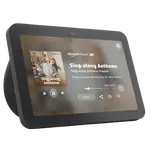 AmazonAmazon Echo Show 8 (3rd Gen) AmazonAmazon Echo Show 8 (3rd Gen) | $149.99 | 4.4 | 30.2K | 8" | YES | YES | ViewBUY NOWCheck price |
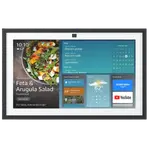 AmazonAmazon Echo Show 15 AmazonAmazon Echo Show 15 | $299.99 | 4.4 | 6.3K | 15.6" | YES | YES | ViewBUY NOWCheck price |
Pick the assistant, then the hardware
The most important decision in a hands-free setup is the voice assistant, because it determines which smart home devices, routines, and services you can control by voice. Most people choose based on the ecosystem they already use and the devices they want to integrate.
Once the assistant is set, the hardware follows. Smart speakers give you voice control plus music in rooms where audio matters, and a network of them lets you talk to your home from anywhere in the house. Smart displays add a screen for video calls, recipe steps, camera feeds, and at a glance status, making them ideal for the kitchen and the front entry.
Routines are where it pays off
A single voice command can do far more than turn on one light. Routines chain actions together, so a phrase like good morning can raise the thermostat, open the blinds, start the coffee, and read out the day's schedule. This is where hands-free control moves from novelty to genuinely useful.
To get there, place speakers and displays where you actually issue commands: the kitchen, the bedroom, the entryway. Prioritize devices with strong far field microphones so they hear you across a noisy room, and group them so the whole home responds to your voice as one system rather than a set of isolated gadgets.
Frequently Asked Questions
- What is the difference between a voice assistant, a smart speaker, and a smart display?
- The voice assistant is the software that understands commands and controls your devices. A smart speaker is hardware that lets you talk to that assistant and play audio. A smart display adds a screen, so you can see camera feeds, video calls, timers, and visual responses, not just hear them.
- Should I choose the assistant or the device first?
- Choose the assistant first. It decides which smart home devices, routines, and services you can control by voice. Once you know which assistant fits your ecosystem and devices, pick the speakers and displays that run it.
- Where should I put a smart display versus a smart speaker?
- Smart displays shine in the kitchen and entryway, where a screen helps with recipes, timers, video calls, and camera feeds. Smart speakers suit bedrooms, offices, and living spaces where you mainly want voice control and music without a screen.
- Can voice control trigger more than one action at once?
- Yes. Routines let a single phrase trigger many actions across lights, climate, security, and media. For example, one command can adjust the thermostat, turn on lights, and start playback, which is where hands-free control becomes genuinely useful.