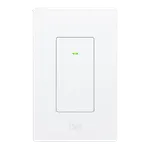




Aqara Touchscreen Switch S100 US Review: A Wall Plate That Runs the Whole Room
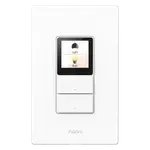
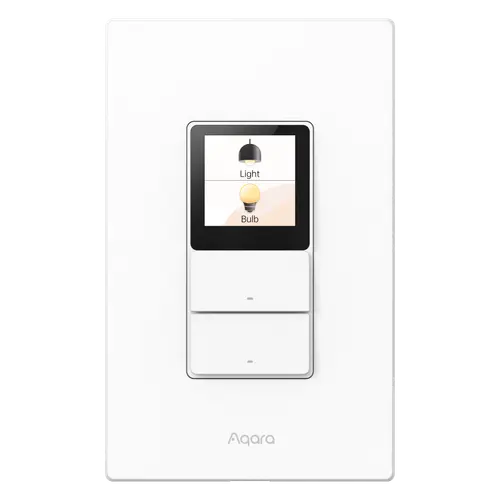
The S100 US turns a two-gang box into a control panel: two metered relays with two physical buttons, plus a colour touchscreen that carries six more wireless buttons and your scenes. It is a native Matter over Wi-Fi accessory with a built-in Thread border router, which is how it lands in Apple Home, Alexa, Google Home, SmartThings and Home Assistant directly. The catch is that the screen's useful half, naming buttons, choosing icons and linking devices and scenes to cards, is configured in the Aqara Home app and expects an Aqara Matter hub, so a switch paired into a third-party platform on its own shows generic numbered buttons in a fixed layout. Buy it as a scene controller that also switches two circuits, and budget for the hub.
- Apple Home and Matter households
- Scene and shortcut control
- Two-circuit switch plates
- Aqara ecosystem owners
One switch per light circuit.
Buy on Amazon USACheck pricePros
- Two independent metered relay channels plus eight programmable wireless buttons on one plate
- Native Matter over Wi-Fi, joining Apple Home, Alexa, Google Home, SmartThings and Home Assistant
- Built-in Thread border router, which strengthens the Thread mesh in Aqara Home and SmartThings
- Real-time energy monitoring with daily, weekly, monthly and yearly history
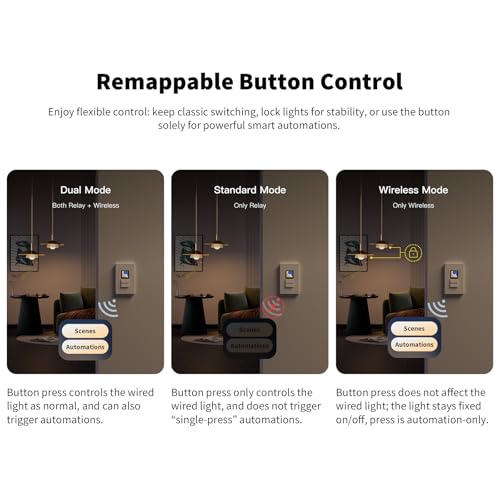
- Three button modes, including a wireless mode that leaves smart bulbs permanently powered
- Dual-band Wi-Fi across 2.4 GHz and 5 GHz, plus Bluetooth for setup
- Power-off memory, with overload and over-temperature protection on the relays
- Straightforward installation, and the physical buttons keep working for the whole household
Cons
- Naming buttons, picking icons and linking scenes to the screen need the Aqara Home app and an Aqara Matter hub
- Paired into a third-party platform on its own, the cards arrive as generic numbered buttons in a fixed layout
- Standby wallpaper and clock settings exist on the device but were still inert for owners who tried them
- Apple Home presents the relays as lights, so a fan circuit ends up filed under lighting
- Wi-Fi dependent: one owner reported dropouts that left it unavailable and replayed queued button presses
- Isolated reports of a unit running warm in the wall and of a screen failing within a month
- Requires a neutral wire in the box, which rules out many older two-gang installations
- Rated for 400W of LED or CFL load per channel, so it is a lighting switch rather than a heavy-load relay
- One year warranty, and the touchscreen is smaller in person than the photos suggest
Who is the Aqara Touchscreen Switch S100 US for?
It suits a US wall box that already feeds two circuits and sits somewhere you walk past constantly: a hallway, a kitchen entrance, the top of the stairs. The two physical buttons keep behaving like an ordinary switch for everyone in the house, while the screen turns the same plate into the room's control panel for scenes, plugs, lights and other Matter devices. Owners describe using it exactly that way, one replacing a four-gang plate with a single central button controller, another running an Apple Home security routine from it by arming night mode with a button and opening the garage from the screen. Energy monitoring on the two wired circuits comes along with it, reported live and kept as daily, weekly, monthly and yearly history.
What buyers love
Installation gets consistently good marks: it goes in much like the Aqara switches people already own, and owners describe getting it wired, paired and running the same evening. Speed is the other recurring compliment, with one owner reporting that a single press lights a whole group of Hue bulbs almost instantly. People running Home Assistant are among the happiest with it, and one who struggled early says a firmware update closed the gaps and sent them back to buy two more units. The physical buttons are the quiet win: they switch the wired lights directly whatever the screen is doing, which is what lets a device this unusual pass the household test.
What to know before you buy
The screen is the part to research before ordering. Naming the buttons, changing their icons and linking devices or scenes to the cards all happen in the Aqara Home app, and that path expects an Aqara Matter hub (M3, M100, M200 or W200 at launch, on recent firmware), so a buyer who pairs the switch straight into another platform gets numbered generic buttons and a fixed two-card layout. Several owners hit that wall, and one bought an Aqara hub afterwards to unlock the rest. The standby wallpaper and clock settings are present on the device but were still inert for the owners who tried them, and Aqara support confirmed as much to one of them. In Apple Home the relays present as lights rather than as switches, which is awkward when one of them drives an exhaust fan. There are reliability reports as well: one owner found that Wi-Fi dropouts left the switch unavailable and then replayed queued button presses, one returned a unit that ran warm inside the wall, and one had a screen fail after a month and then struggled to get it replaced. Practical constraints round it off: it needs a neutral wire, the touchscreen is physically smaller than the product photos suggest, and the warranty runs one year.
Is the Aqara Touchscreen Switch S100 US worth it?
Judged as a plain two-gang smart switch it is expensive, and more than one owner says so. The case for it is the combination, which nothing else in Aqara's US lineup does at once: two metered relays, eight programmable triggers, a Matter accessory that also runs a Thread border router, and a screen you can fire scenes from. In a home that already has an Aqara Matter hub, that adds up to a genuinely capable wall panel and is the strongest reason to buy one. If the plan was to pair it into Apple Home or SmartThings on its own and leave the Aqara app alone, much of what you are paying for stays out of reach today, and its middling average rating reflects a product whose software is still catching up with its hardware.
Frequently asked questions
Does the Aqara Touchscreen Switch S100 US need a hub?
To control it you need a Matter hub from whichever ecosystem you use, the same as any Matter accessory. To get the screen working properly, which means naming buttons, choosing icons and linking devices and scenes to cards, you also want the Aqara Home app with an Aqara Matter hub such as the M3, M100, M200 or W200.
Which smart home platforms does it work with?
It is a native Matter over Wi-Fi device, so it works with Apple Home, Amazon Alexa, Google Home, Samsung SmartThings and Home Assistant, and Aqara's own documentation also lists Homey. The Thread border router function is available in Aqara Home and SmartThings.
Does it require a neutral wire?
Yes. The wiring uses line, neutral, ground and two load terminals, and the always-on touchscreen needs that neutral, so check what is in your wall box before ordering.
How much load can each channel switch?
The rated load is 10 A for incandescent lamps and 400 W for LED or CFL, on an input of 100 to 240 V at 50 or 60 Hz, across two independent channels.
How many buttons does it actually have?
Eight programmable wireless switches: six virtual buttons on the screen and the two physical buttons below it, which double as wireless triggers in dual or wireless mode. The physical pair also switches the two wired circuits directly, whatever the screen is showing.
Does it track energy use?
Yes. It reports live power draw on the wired circuits and keeps the history by day, week, month and year in the app. How much of that reaches a third-party platform varies by ecosystem.