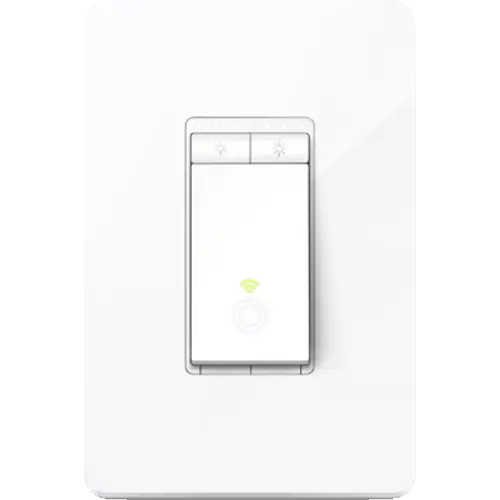


TP-Link Kasa HS220 Review: Hub-Free Dimming That Owners Keep Installing Room by Room
The Kasa HS220 is the cheap, no-hub way to put a real dimmer on an existing light circuit: it joins a 2.4 GHz network on its own and then answers to Alexa, Google Home, SmartThings and Home Assistant. What separates it from a plain smart switch is the app side, a low-end dimming calibration that kills flicker on mixed LED bulbs and a fade on and fade off speed you set yourself. The two constraints are physical rather than smart, a neutral wire in the box and single pole wiring only, and buyers who clear both tend to come back and buy more of them for the rest of the house.
- Budget smart lighting
- Hub-free setups
- Dimmable LED bulbs
- Bedroom and outdoor lighting
- Home Assistant users
One switch per light circuit.
Buy on Amazon USACheck pricePros
- No hub required, it connects straight to 2.4 GHz Wi-Fi
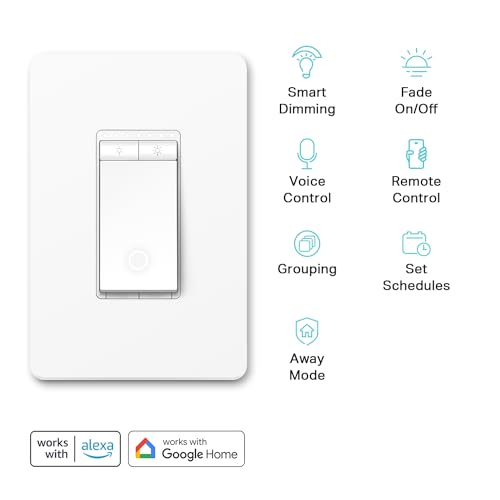
- Works with Alexa, Google Home, SmartThings and Home Assistant
- Smooth dimming, with an app calibration that removes flicker on LED bulbs
- Adjustable fade on and fade off speeds, plus brightness presets
- Sunrise and sunset scheduling, countdown timers and Away Mode
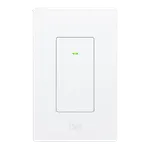
- Indicator LED can be adjusted or switched off from the app
- Rated for 300 W incandescent, 150 W LED and 150 W CFL
- 2 year warranty
Cons
- Neutral wire required, which many older switch boxes do not have
- Single pole only, so it cannot replace a 3-way switch
- Deep rear body that is a squeeze in a shallow or crowded box
- 2.4 GHz Wi-Fi only, and 120 V only, so it is not usable on 230 V supplies
- No Apple Home support and no Matter certification
- No energy monitoring
- No setting for which state the light returns to after a power cut
Who is the TP-Link Kasa HS220 for?
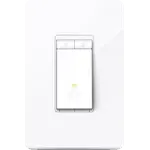
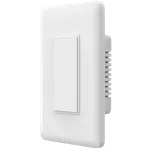
This is a wired replacement for a normal single-pole dimmer or light switch, aimed at people who want the fixture to be smart rather than every bulb in it. It speaks 2.4 GHz Wi-Fi directly, so there is no bridge, gateway or coordinator to buy first, and that is the reason it comes up again and again against hub-based Zigbee and Z-Wave systems: one owner running dozens of Kasa devices points out that a hub plus its per-device premium is the cost this design skips entirely. The installs described in the reviews are ordinary rooms rather than exotic setups, living room and dining room chandeliers, kitchen island lights, bedrooms, decks and outdoor lighting. Several owners run it under Home Assistant, and the official TP-Link integration lists this exact model, so it fits a self-hosted setup as easily as the Kasa app.
What buyers love
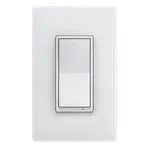
The install is the first surprise for most people: the Kasa app walks through the wiring step by step, the box includes wire labels, and owners with no electrical background describe finishing in about fifteen minutes. The dimming itself is the second. Owners who came from cheap dimmers keep mentioning that the range is smooth and consistent, with no dead zone at the bottom, and the app's dimming calibration is what gets the credit: you set the low end for your particular bulbs and the flicker goes away. Beyond that, the customisation is what turns owners into repeat buyers, adjustable fade on and fade off speeds for a gentle wind-down at night, brightness presets, schedules that follow sunrise and sunset so outdoor lighting tracks the seasons, Away Mode, and grouping so several Kasa devices move together. Voice control through Alexa and Google Home comes up in almost every positive review, and reliability holds up in the long-term updates: owners report the switches reconnecting on their own after power cuts, and still working as an ordinary manual switch when the network is down. The Decora styling matching the rest of a home's switches earns its own mentions, and so does the fact that the indicator light can simply be turned off in rooms where it is unwanted.
What to know before you buy
The neutral wire is the single biggest gotcha and buyers raise it more than everything else combined: without a neutral in the switch box the install cannot be completed, and retrofitting one into an older home is not a small job. It is also strictly single pole, so a hallway or stairwell switched from two locations is out of scope, and TP-Link sells a different model for that wiring. The body behind the faceplate is deep, and more than one owner recommends moving to a larger box before starting, particularly in older homes where the existing box is shallow or already crowded. On the network side it is 2.4 GHz only, and one owner installing several at once found it awkward to work out which physical switch matched which entry in the app. Longer-term feedback is mostly positive but not uniformly so: one owner reports that after a couple of months two units began drifting in brightness and occasionally cutting out before coming back. This is also an older design that predates TP-Link's HomeKit and Matter switches, so there is no Apple Home path and no Matter certification, there is no energy monitoring on board, and there is no setting to choose which state it returns to after a power cut. Finally, it is a 120 V North American switch, which is exactly why the rare one-star reviews come from buyers in 230 V countries.
Is the TP-Link Kasa HS220 worth it?
For a single-pole circuit in a box with a neutral, this is close to a default recommendation, and its sustained sales rank backs that up. It is a budget-priced dimmer that skips the hub cost completely, carries a 2 year warranty, handles 300 W of incandescent lighting or 150 W of LED or CFL on a 2.5 A 120 V rating, and has years of owner feedback behind it rather than a launch-week impression. The strongest signal in the reviews is not any single feature but the pattern of people buying one, then coming back for the rest of the house. Spend more only if you specifically need Apple Home, Matter, energy monitoring or 3-way wiring, because those are the four things this dimmer genuinely does not do.
Frequently asked questions
Does the Kasa HS220 need a hub?
No. It joins a 2.4 GHz Wi-Fi network directly and is set up from the Kasa app, with no bridge or gateway to buy.
Does the Kasa HS220 require a neutral wire?
Yes. A neutral wire in the switch box is required, and it is the most common reason an install cannot go ahead. Check the box before buying.
Can the Kasa HS220 be used in a 3-way circuit?
No. It is a single pole dimmer, so it cannot control a light that is also switched from a second location. TP-Link sells a separate model for that wiring.
What loads can the Kasa HS220 dim?
It is rated at 2.5 A on a 120 V circuit, for up to 300 W of incandescent lighting, 150 W of dimmable LED or 150 W of CFL. It uses leading edge (TRIAC phase cut) dimming, so the bulbs need to be dimmable and compatible with that method.
Does the Kasa HS220 work with Home Assistant?
Yes. The official Home Assistant TP-Link integration lists the HS220 among its supported Kasa wall switches, and it works alongside the Kasa app rather than replacing it.
Does the Kasa HS220 work with Apple Home or Matter?
No. It predates both, and TP-Link's HomeKit and Matter-certified switches are different models. Alexa, Google Home, SmartThings and Home Assistant are the supported routes.