SwitchBot Lock Ultra Vision Combo Review: The Retrofit Lock With 3D Face Unlock and Every Entry Method
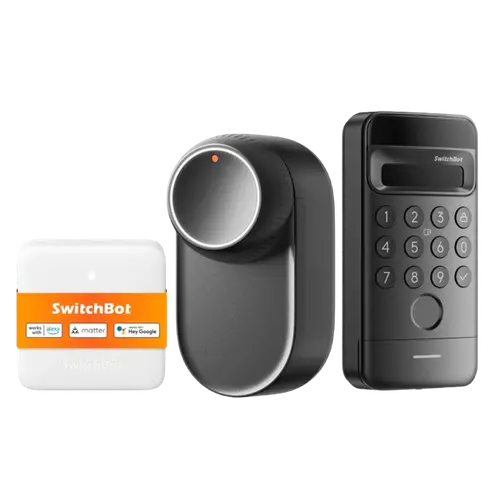
The SwitchBot Lock Ultra Vision Combo bundles SwitchBot's flagship retrofit lock with the Keypad Vision (3D face recognition) and a hub, giving you nearly every entry method: face, fingerprint, passcode, NFC, Apple Home Key, app and physical key. Face unlock is fast and genuinely convenient, it installs on a euro cylinder without drilling, and it supports Matter plus all major platforms including Home Assistant. It is a clear improvement over the older Pro Lock (especially calibration), with isolated reliability and security niggles and helpful support the main caveats.
- European retrofit doors
- Hands-free face unlock
- All-in-one entry methods
- Matter / Home Assistant setups
Pros
- Fast, convenient 3D face recognition unlock
- Nearly every entry method: face, fingerprint, keypad, NFC, Apple Home Key, app and key
- Easy, drill-free euro-cylinder retrofit install
- Hub included; Matter plus HomeKit, Google, Alexa, SmartThings, Home Assistant and IFTTT
- Improved manual/automatic calibration over the Pro Lock (fewer lockouts)
- Rechargeable battery (around nine months), quiet night mode and temporary guest codes
Cons
- Isolated reliability issues (faulty units, night-latch calibration)
- Rare but serious reports: face unlock for a similar face, a self-unlock incident
- Support replacements can take some back-and-forth
- Euro-cylinder retrofit only (not US deadbolts)
- Not weather-resistant
- Wi-Fi/Matter rely on the included hub; long-term reliability still unproven
Who is the SwitchBot Lock Ultra Vision Combo for?
This is an all-in-one retrofit smart lock for European-style doors, for people who want the widest set of entry options in one package. The combo includes the Lock Ultra, the Keypad Vision with 3D face recognition, and a SwitchBot hub. Between them you get face unlock, fingerprint, passcode (with one-time, periodic and anti-peep options), NFC, Apple Home Key, app control and your physical key, plus auto-lock, away mode and geolocation auto-unlock. It mounts on the existing euro cylinder without drilling. The lock itself uses Bluetooth, with Wi-Fi and Matter provided by the included hub, and it works with Apple HomeKit, Google Home, Alexa, SmartThings, Home Assistant, IFTTT and Matter. It suits anyone wanting hands-free face entry and maximum flexibility on a retrofit.
What buyers love
The 3D face recognition is the star: owners describe walking up with full hands and getting in instantly, no keys, phone or even a keypad touch, and call it fast and reliable. They also love the breadth of entry methods and the convenience of temporary passcodes for guests or house-sitters. Installation on a euro cylinder is repeatedly called easy and drill-free (a fit checker on SwitchBot's site helps confirm compatibility), and the build feels solid. Owners upgrading from the Pro Lock highlight that the Ultra fixes their biggest pain point, calibration, with both manual and automatic options ending the lockouts and recalibration hassles. The rechargeable battery (rated around nine months), quiet night mode, included hub for Matter/Home Assistant, and responsive support round out the praise.
What to know before you buy
There are some reliability and security wrinkles to weigh. A few owners received a faulty first unit or hit calibration issues (notably with night-latch locks, sometimes resolved by removing a cover over the screws), and SwitchBot replaced them after some back-and-forth, support is praised but the process can take time. More concerning, isolated reports include face recognition unlocking for a similar-looking family member and one lock unlocking on its own in the early hours, both safety-relevant and addressed via replacements. It is a euro-cylinder retrofit (not a US deadbolt), is not weather-resistant, and Wi-Fi/Matter rely on the included hub. As a newer product, long-term reliability is still being proven.
Is the SwitchBot Lock Ultra Vision Combo worth it?
For European households wanting the most complete, hands-free smart lock, yes, it earns a good average rating and the combo's face unlock plus every other entry method, on an easy retrofit with Matter and a hub included, is genuinely convenient and flexible. It is a meaningful step up from the Pro Lock. Just be aware of the isolated reliability/security reports, confirm your cylinder fits, and know it is a euro-cylinder retrofit. If you want maximum entry options and face unlock, it is a strong, well-equipped choice.
Frequently asked questions
What entry methods does the Lock Ultra Vision Combo support?
Almost everything: 3D face recognition and fingerprint via the Keypad Vision, plus passcode (one-time, periodic and anti-peep), NFC, Apple Home Key, app control and your physical key. Auto-lock, away mode and geolocation auto-unlock are also included.
Is it a retrofit, and will it fit my door?
Yes, it is a retrofit that mounts on an existing European euro-profile cylinder without drilling. SwitchBot provides an online fit checker to confirm compatibility before you buy. It is not designed for US-style deadbolts.
Does the combo include a hub, and do I need it?
Yes, the combo includes a SwitchBot hub. The lock uses Bluetooth on its own, and the hub adds Wi-Fi, remote access and Matter, enabling integration with Home Assistant and the other platforms.
How does it compare to the SwitchBot Pro Lock?
Owners who upgraded say the Ultra is a clear improvement, especially calibration: it offers both manual and automatic calibration, which ends the recalibration and lockout frustrations the Pro Lock could have. It also adds 3D face recognition via the Keypad Vision.
Is the face recognition secure?
It is fast and convenient and works well for most owners, but there are isolated reports of it unlocking for a similar-looking family member, and one report of a lock unlocking on its own. SwitchBot addressed these via replacements. Treat face unlock as a convenience and keep secure backup methods configured.