



SwitchBot Hub 3 Review: A Smart Hub With a Screen, Dial and Physical Buttons
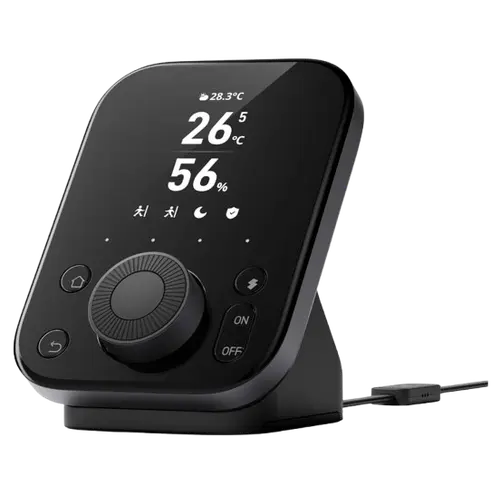
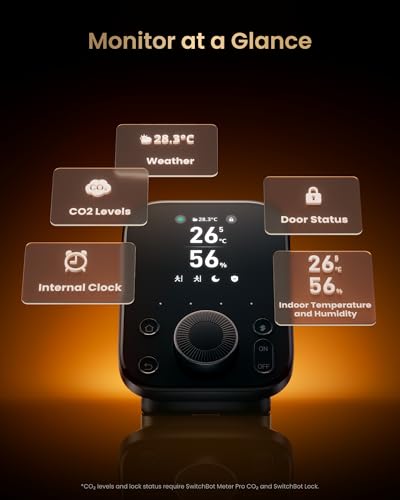
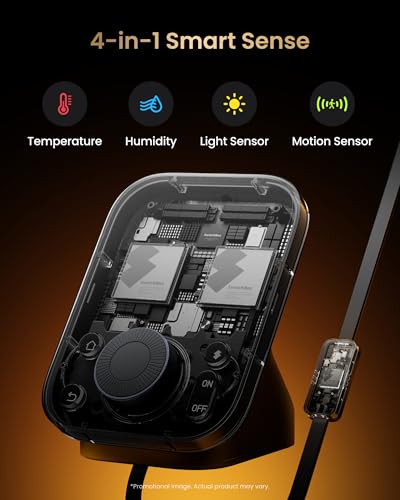
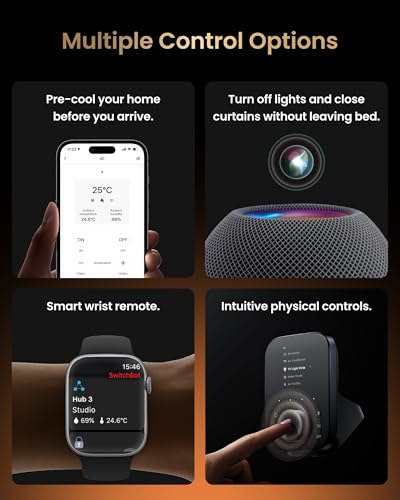
The SwitchBot Hub 3 turns the company's hub into a control panel you want on display: a 2.4-inch screen, a rotary dial and four programmable buttons let you adjust volume, AC temperature or trigger scenes without touching your phone. It keeps the strong learning IR blaster (now with longer range), built-in temperature, humidity, light and presence sensors, and acts as a Matter bridge that brings older Bluetooth SwitchBot devices into Apple Home, Google Home, Alexa, SmartThings and Home Assistant, supporting up to 30 devices. The trade-offs: it is noticeably more expensive than the Hub 2 or Mini, the firmware still needs polish (occasional slow menus or crashes for some), HomeKit works only via Matter and Shortcuts rather than native scenes, the screen is not a touchscreen, and it is 2.4GHz Wi-Fi only with no Ethernet.
- SwitchBot ecosystem owners
- Physical-control fans
- IR / AC and TV control
- Matter bridging to HomeKit
Pros
- On-device control: 2.4-inch screen, rotary dial and four programmable buttons
- Improved learning IR blaster with longer range for TVs, ACs, fans and projectors
- Built-in temperature, humidity, light and presence/approach sensors
- Matter bridge brings Bluetooth SwitchBot devices into HomeKit, Google, Alexa and Home Assistant
- Doubles as a clock/status display; supports up to 30 devices
- Fast, often local automations and easy migration from Hub 2 / Hub Mini
Cons
- Pricier than the Hub 2 or Hub Mini
- Firmware still maturing (occasional slow menus or crashes for some)
- HomeKit works via Matter and Shortcuts, not native HomeKit scenes
- Screen is not a touchscreen, and build/dial can feel plasticky for the price
- 2.4GHz Wi-Fi only with no Ethernet; short included IR cable, few IR presets
- No Zigbee, Thread, Z-Wave, speaker or microphone
Who is the SwitchBot Hub 3 for?
This is the flagship SwitchBot hub for people who want tactile, off-the-phone control. It adds a 2.4-inch IPS screen, a rotary dial and four programmable soft buttons, so you can control a selected device or fire a scene directly from the hub (turn AC up or down, adjust a bulb, run a goodnight routine), which is great for guests and family. It keeps the learning IR blaster (mimicking existing remotes in seconds, with longer range than past hubs) to control TVs, ACs, fans and projectors, and it has built-in temperature, humidity, light and presence sensors plus an approach sensor that wakes the screen. It connects over 2.4GHz Wi-Fi and Bluetooth, supports up to 30 devices, and acts as a Matter bridge to expose SwitchBot gear and IR devices to Apple Home, Amazon Alexa, Google Home, Samsung SmartThings and Home Assistant. It best suits owners with several SwitchBot devices, anyone wanting physical controls and a clock-style display, and IR/AC control fans.
What buyers love
The standout is the physical controls. Owners repeatedly call the dial and programmable buttons a game changer, using them to control volume, AC and scenes without the app, which makes the smart home usable by the whole family. The bright screen doubling as a clock with temperature, humidity and device status is a frequent favorite, and the approach/presence sensor enables fast, walk-in automations. The improved IR blaster draws praise for longer range and precise learning, with several owners cloning stubborn old AC remotes (including units that even Broadlink could not handle). As a Matter bridge it reliably brings older Bluetooth SwitchBot devices (curtains, locks, sensors) into Apple Home, Google and Home Assistant, automations run quickly (often locally), Bluetooth range is strong, and migrating from a Hub 2 or Hub Mini is quick. The deep customization in the stable SwitchBot app and the ability to map IR controls to the physical dial round out the appeal.
What to know before you buy
It is clearly pricier than the Hub 2 or Mini, so it is best if you will actually use the screen and controls rather than hide it away. The firmware still feels like it is maturing: a few owners report slow menu navigation or occasional crashes (it does auto soft-reset), limited ability to change some default device buttons, and that HomeKit integration is via Matter and Shortcuts rather than native, so it cannot directly trigger HomeKit scenes. The screen is not a touchscreen (you drive it with the dial and buttons), a couple of buyers felt the build and dial were a bit plasticky for the price, and the included IR cable is short for some placements. It still ships with relatively few preset IR templates (though learning your own is easy), and it is 2.4GHz Wi-Fi only with no Ethernet. There is no Zigbee, Thread, Z-Wave, speaker or microphone, and at least one buyer had a poor support experience reconnecting to Wi-Fi.
Is the SwitchBot Hub 3 worth it?
If you are invested in SwitchBot and value physical controls, yes: the screen, dial and buttons genuinely change how you use the hub, the IR and sensor features are excellent, and it bridges everything to Matter and the major platforms. It is the most capable SwitchBot hub for a complete ecosystem. But it is a premium-priced device, so if you only need to connect devices to Wi-Fi and tuck the hub away, the cheaper Hub 2 makes more sense. Buy it for the on-device control and the upgraded IR, expect firmware to keep improving, and know that HomeKit support is Matter-and-Shortcuts based and the network is Wi-Fi only. For SwitchBot power users, it is the most complete option right now.
Frequently asked questions
What makes the Hub 3 different from the Hub 2?
The Hub 3 adds a 2.4-inch screen, a rotary dial and four programmable buttons for direct on-device control, a presence/approach sensor, longer IR range and support for more devices (up to 30). It costs more, but it is far more of a control panel than the Hub 2.
Does it work with Apple HomeKit, Google Home and Alexa?
Yes, it works with Apple Home, Google Home, Amazon Alexa, Samsung SmartThings and Home Assistant as a Matter bridge. Note HomeKit integration is via Matter and Apple Shortcuts rather than native HomeKit scenes.
Can it control my old TV and air conditioner?
Yes. Its improved learning IR blaster mimics existing remotes in seconds with longer range, controlling TVs, ACs, fans and projectors, and owners report it can clone stubborn old AC remotes that other IR hubs could not. You can map these to the physical dial and buttons.
Does it have a touchscreen?
No. It has a 2.4-inch IPS screen, but it is not touch. You control it with the rotary dial and the physical buttons, and an approach sensor wakes the display when you get close.
Does it support Ethernet?
No. It connects over 2.4GHz Wi-Fi and Bluetooth only, with no Ethernet port. As with other SwitchBot hubs, a stable 2.4GHz network helps keep it reliably connected.